




Articles > AEDTools Pro v.1.1 review
If you can play the file you can convert it!
July 22nd 2005 the MediaTwins company (Czech Republic) released the brand new product named AEDTools Pro which goes by the slogan: "If you can play the file you can convert it!" It's not a secret that many companies offer the audio converters with multi-format support. But AEDTools Pro has a great number of new solutions which is hard to find in others converters. Remember, that this company was the innovator and trendsetter for years on the multimedia tools market.
Thus what is AEDTools Pro?
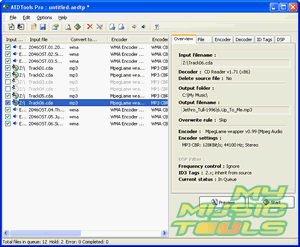
At the first look the interface design looks rather
simple. After working a bit, one starts to realize
that there are no unessential features and functions,
only things you need for work. The applications
starts with the traditional for MediaTwins' multimedia
tools question: "What do you want to do?" There
is a choice of many sources for convertation.
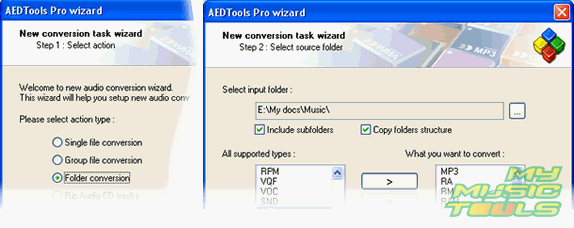
You may start with the single file or multiple
files convertation - in this case the files structure
remains the same including sub directories. Good
choice for users for saving habitual arrangement
of the huge music collection in two clicks. Then
goes the standard target data menu including the
templates filename restoring.
But the trickiest thing is still to come. The AEDTools Pro is a plug-in based converter. What it is? The number of formats supported by the program depends on the pre-set plug-ins just like in popular WinAMP player. By the way, input WinAMP plug-ins are also supported (the DirectShow filters support was claimed but not for the current version). Oh boy, that means that if I can play an audio file with WinAMP so I can convert it with AEDTools Pro! The application has à necessary "must have" package of plug-ins just like any modern converter has by default plus user can enlarge the plug-ins collection adding formats such as RealMedia, MP3Pro by Thomson, etc.
Smart Frequency Control function.
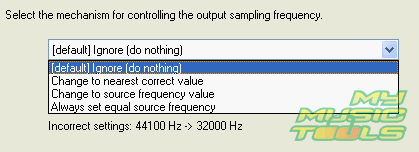
Sometimes there could be a mistake with the result of convertation. In the one hand everything looks OK, we have a nice sounds audio file and we set all the suitable parameters for the convertation but after all we have a horrible sound, things like "tingle" or "waving sound". What went wrong? The trap is in theory of digital sound (DSP - Digital Sound Processing). Since Windows ACM works in the integer mode then the wrong frequency digitilizing convertation leads to these undesirable sound effects. The Smart Frequency Control allows us to correct outgoing settings hurriedly in order to avoid distortions.
Preview mode
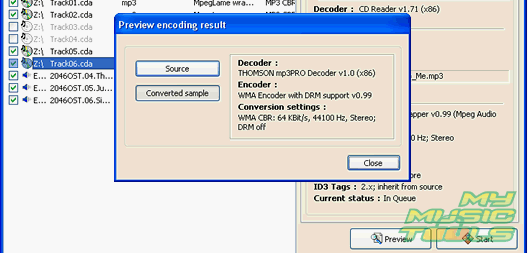
It is better to do a "pre-listening" of a convertation's result in order to control the quality of sound than to wait until the process ends, is it? For those users wishing to convert audio books to reduce the space taken by a file this function is a very useful one.
Using DSP filters
This function is to be included into the next program releases and authors of the product informed us that the equalizer will appeal as well as new volume control plus a filter for correct transformation process. This list will be enlarged in the nearest future.
In a few words
And finally, this program is a next step ahead in the scale of converters by MediaTwins following the best traditions of the company! Powerful, user-friendly interface and all the useful functions classic and new ones - all these features perform this product as an outstanding program on market!


