




How do I convert AVI to Zune?
Introduction.
There are many portable audio/video players. We can use them for learning and entertainment while traveling or waiting for something. These small devices are able to save the time that otherwise is wasted.
But where should we get movies for those players? They have some special format, don't they?
Yes, it's true. However, you can easily convert any of your movies into your player's specific format with help of some advanced video tool containing a Zune converter, like Movavi Video Suite. We will describe how to prepare a usual AVI movie for loading into a Microsoft Zune player.
Step 1: Download and install the program.
Download Movavi Video Suite to a known location. Launch setup and follow on-screen instructions to install the application.
Step 2: Choose to run Video Converter tool.
Start the program. A welcome window will be shown. Here you can pick out a tool for your task.
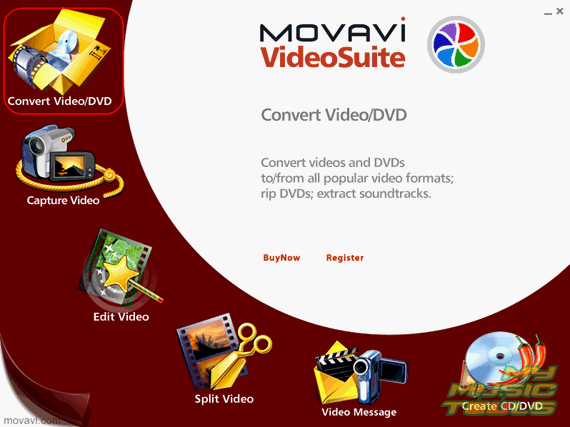
We need to convert AVI to Zune, so let's click the convert video item in the left upper corner.
Step 3: Convert your video file into Zune format.
The corresponding application will be launched. It will take us to a window looking like the following:
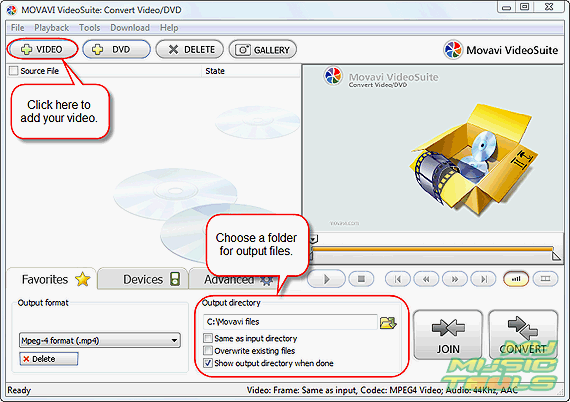
Take a look at the "Output directory" area. Select a folder where output files (video in Zune format) should be placed and check (or uncheck) the other options. Then click the "+ VIDEO" button on the toolbar.
This will produce a usual "Open" dialog.
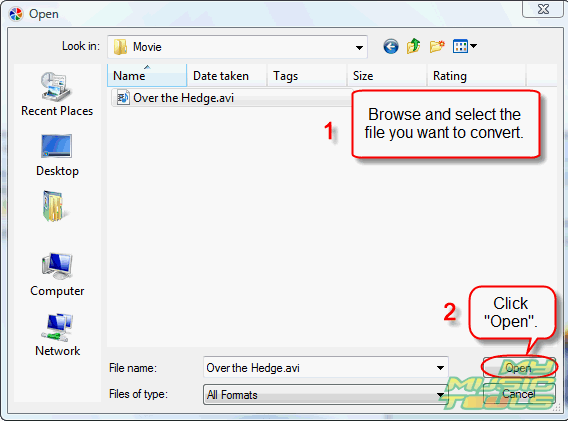
Browse to the folder with the source video file. Select the file, click "Open".
The movie will be added to the conversion list.
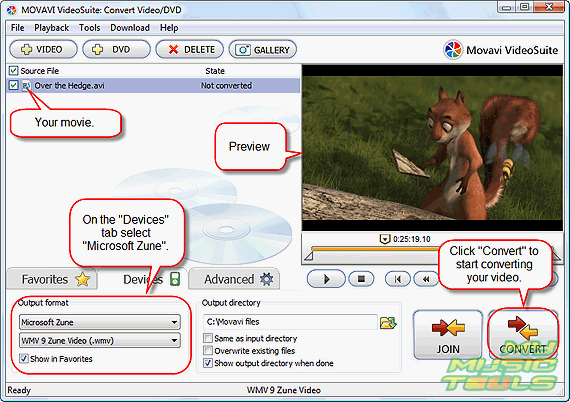
Now, click "Devices" tab in the lower part of the window and pick out "Microsoft Zune" from the dropdown list. Finally, click the large "CONVERT" button in the right lower corner of the program to start converting AVI to Zune.
The trial version of Movavi Video Suite allows you to convert only 30% of a video file. If you are satisfied with the quality, features, and usability, you can purchase the program and remove the restriction with your registration data.


Search
Related
- How to share screen videos online?
- How to rotate videos?
- How to capture video?
- How do I convert AVI to Zune?
- Movavi VideoSuite 4.4 review
- How to record a screen video?
- How to make a video tutorial?
 How to add a watermark to your video?
- How to fix a blurred video?
- How to increase brightness of a dark video?
- How do I combine AVI episodes into a full-length professional looking movie?
- How do I stay anonymous in a webcam chat?
- How do I improve quality of videos and old movies?
- AVS Video Editor 3.4 review
- MOVAVI Releases EnhanceMovie 2.0
- MOVAVI Releases EnhanceMovie 1.3
- How to play MKV file?
- How to play any video?
Ask our expert
- How to share screen videos online?
- How to sort duplicate music files by ID3 tags?
- How to get quick updates on movies by director?
- How to convert multiple MIDI files into an MP3?
- How to rotate videos?
- How to convert WMA to WAV?
- How to play MIDIs on an iPhone?
- How to split an audio file into equal parts?
- How to split m4b audiobooks into chapters for free?
- How to convert videos for You Tube?
