




How do I convert DVD to iPod format?
Introduction.
Portable devices came into our lives not very long ago, but it is already hard to imagine modern world without them. Mobile phones, pocket computers, all sorts of portable media players. Among media players, Apple iPod is surely worth of mentioning. It's not just 'another' player, its popularity goes beyond any imagination. Once in a time some company announces another 'iPod killer', but the situation doesn't change. This stylish, convenient, easy-to-use player continues to dominate the market. Mostly audio player in the past, it conquers new dimensions of the market and now is able to show videos.
So, we will explore how one can convert DVD-Video to iPod movie. We will use Cucusoft DVD to iPod Converter to illustrate the process.
Step 1: Download and install Cucusoft DVD to iPod Converter.
Download the program to a known location. Run setup and follow on-screen instructions to install the application.
Step 2: Launch the program. Select output profile and folder.
Start Cucusoft DVD to iPod Converter. The program's window will appear.
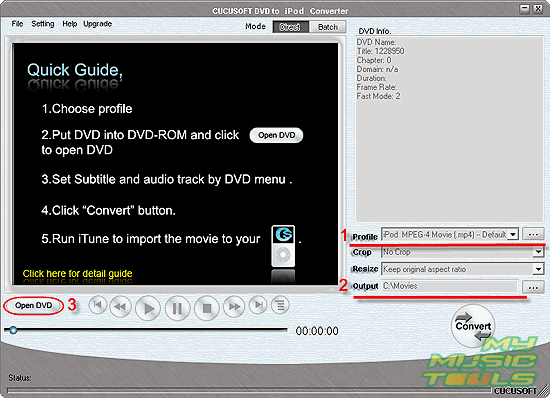
Select output profile (1). Default profile is fully compatible with iPod players, so you don't need to change it if there is nothing special on your mind.
Set a folder for output files (2). You can choose any folder on you computer, only be sure to have necessary permissions to be able to write into the folder.
Insert your DVD into DVD drive and click "Open DVD" button (3). Select DVD drive with the movie.
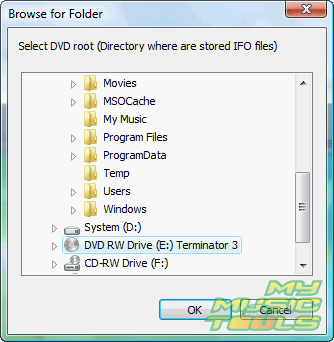
You can also open any folder with DVD structure from your hard drive. The structure should contain also VIDEO_TS folder.
Step 3: Select audio language and subtitles. Start converting.
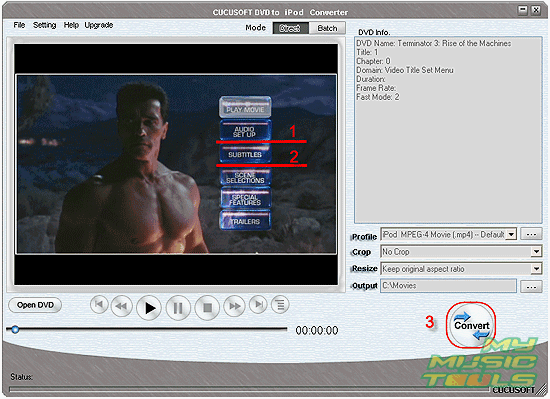
The video converter will open your DVD movie and forward to DVD-menu. Here you can set audio language (1) and subtitles (2), as usual with DVDs, by clicking menu items.
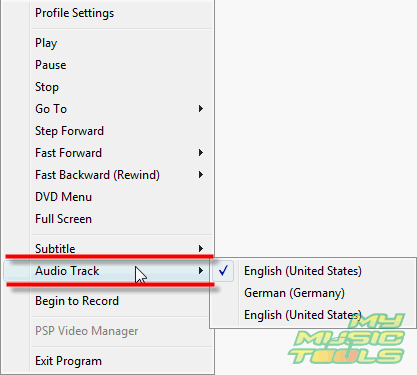
If your DVD doesn't have any menus, or menu is skipped by default, you can right-click the movie and set audio track and subtitles with help of context-menu:
When ready to continue, just click "Convert" (3).
The program will take some time (a few hours, if you have an old computer) to convert full-time DVD movie. The process is automatic and doesn't require any attention.
Step 4: Use iTunes to transfer the converted movie to your iPod.
When video conversion is finished, close the program. Start iTunes or your favorite program for transferring files between computer and iPod. Send the movie to iPod.
Trial version of Cucusoft DVD to iPod Converter puts watermark logo into your movies. To convert movies without the watermark, you should unlock the program with your personal registration key.


Search
Related
Ask our expert
- How to share screen videos online?
- How to sort duplicate music files by ID3 tags?
- How to get quick updates on movies by director?
- How to convert multiple MIDI files into an MP3?
- How to rotate videos?
- How to convert WMA to WAV?
- How to play MIDIs on an iPhone?
- How to split an audio file into equal parts?
- How to split m4b audiobooks into chapters for free?
- How to convert videos for You Tube?
