




How do I convert WMV to AVI?
Introduction.
WMV stands for Windows Media Video. It's a video codec developed by Microsoft to compete with other well-known video codecs, such as DivX, Xvid, RealVideo. It is widely used by different online services that provide streaming video, and the WMV stream itself can be encapsulated into the protected ASF format. However, many WMV video files are available for free.
If you need such a file to be played by your DVD player, and the latter doesn't support WMV-format, you may want to convert WMV to AVI. This can be done with the help of Movavi Video Converter. Among other things the program contains a full-featured WMV converter that works in the both directions.
Step 1: Download and install the program.
Download Movavi Video Converter to a known location. Run setup and follow on-screen instructions to install it.
Step 2: Start the program. Open your WMV video file.
Launch Movavi Video Converter.
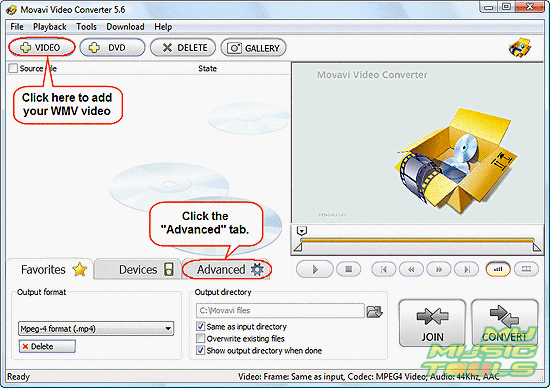
Click the large "+ VIDEO" button on the toolbar to add your WMV file(s). The program allows you to batch-process multiple files, so you may add many WMV files simultaneously.
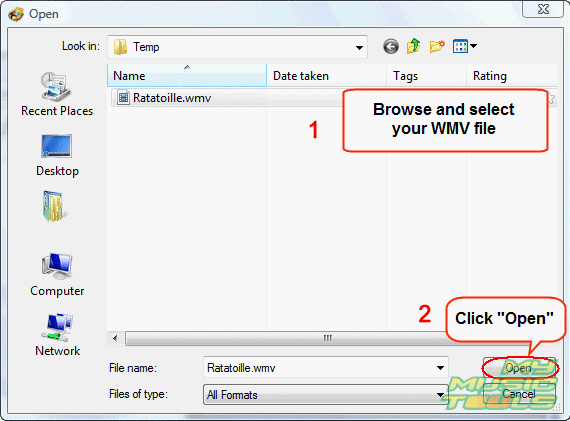
In the usual Windows "Open" dialog, browse to the folder where your video files are stored, select the one you want to convert, click "Open".
Step 3: Convert WMV to AVI.
The file will be added to the convert-list. You can preview it using the built-in player. It is also possible to set start and end time, if you don't intend to convert the whole file.
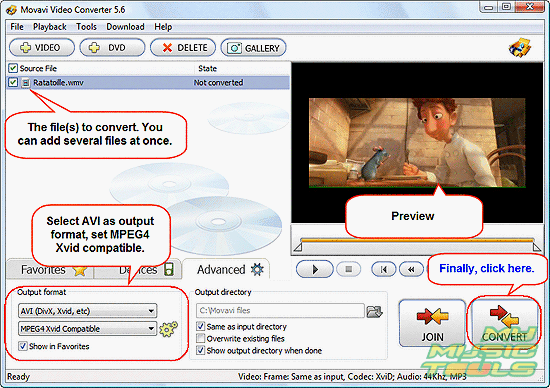
In the lower part of the window, go to the "Advanced" tab. In the "Output format" area, select "AVI (Divx, Xvid, etc)" from the first dropdown list, and "MPEG4 Xvid Compatible" from the second one. The program will automatically use the best converting quality mode. If you don't need quality and want just quick converting, you can change the settings by clicking the cogwheels on the right.
By default the output file will be saved in the same folder where your original file is stored. To set another location, just uncheck the corresponding box in the "Output directory" area and browse to another folder.
Finally, click the large "CONVERT" button in the right lower corner of the program to convert WMV to AVI.
Converting video is a slow process, especially with the best possible quality, so you can just let it run in the background.
The trial version of Movavi Video Converter converts only 30% of a file. If you are satisfied with its features, you can purchase a full version and remove all restrictions with your registration data.


Search
Related
- How to convert videos for You Tube?
- How to convert a video file with subtitles?
- How to convert video for Android?
- How to convert MKV to DVD?
- How to convert TS to AVI?
- How to convert AVI to WMV?
- How to convert AVI to FLV?
- How to convert MKV to MP4?
- How to convert DVD to MKV?
- How to convert MKV to AVI?
- How do I convert to DVD?
- How to convert DVD to MP4?
- How to convert MOV to AVI?
- How to convert AVI to MOV?
- How to convert MP4 to AVI?
- How to merge video files?
- How do I convert AVI to PSP format?
- How do I convert AVI to 3GP?
- How do I convert WMV to AVI?
- How do I convert video to flash?
- ConvertMovie 4.0 review
- Imtoo 3GP Video Converter 3.1 review
- How to convert a video file into the 3GP format?
- Xilisoft 3GP Video Converter 2.1 review
- Videozilla review
- How do I convert MTS to AVI?
Ask our expert
- How to share screen videos online?
- How to sort duplicate music files by ID3 tags?
- How to get quick updates on movies by director?
- How to convert multiple MIDI files into an MP3?
- How to rotate videos?
- How to convert WMA to WAV?
- How to play MIDIs on an iPhone?
- How to split an audio file into equal parts?
- How to split m4b audiobooks into chapters for free?
- How to convert videos for You Tube?
