




How do I create a CUE sheet?
Introduction.
CUE sheet is a special file that contains information about tracks in a continuous audio file. Suppose that you have a large MP3 file with a whole album of some band. Tracks are not separated, which makes searching for particular songs quite difficult. However, you are lucky if you have a small supplement to your MP3 file - a CUE sheet. You can load the CUE file into some media player and see tracks, their names etc. You can also easily burn the file to create Audio CD with tracks. No need to cut the big file.
If you don't have such a file, you can easily create a CUE sheet yourself. Let's consider how this can be done with a program like Visual MP3 Splitter & Joiner.
Step 1: Download and install the program.
Download Visual MP3 Splitter & Joiner to a known location. Run setup and follow on-screen instructions to install the application.
Step 2: Start the program. Open your audio file.
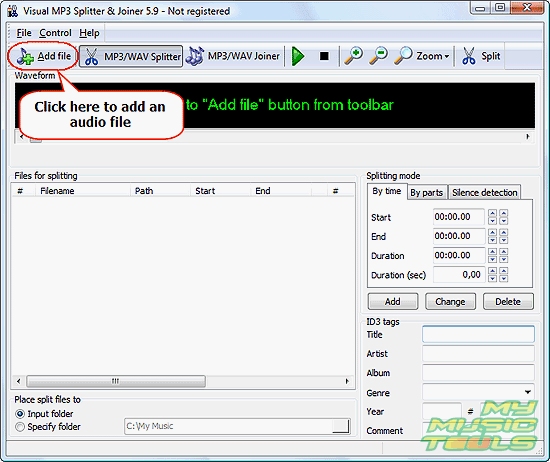
Launch Visual MP3 Splitter & Joiner. Click the "Add file" on its toolbar.
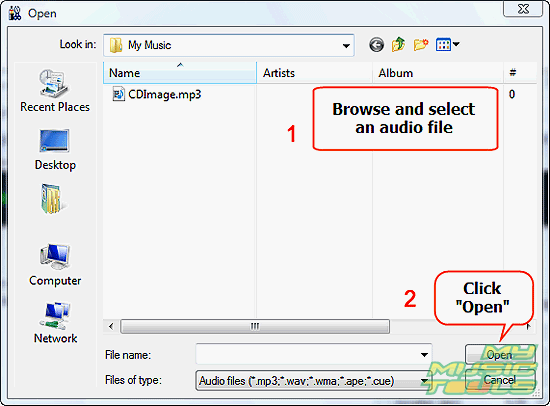
A usual "Open" system dialog pops up. Browse to the directory where your audio file is stored, select it, click "Open".
The program loads the file and builds its waveform. With big files, it can take several seconds. If you have very large files, I don't recommend to zoom out completely. Use the default zooming level.
Step 3: Mark parts for splitting. Save CUE sheet.
As soon as your file is loaded, you can start marking its tracks. This can be done automatically with the built-in silence detection tool, or you can also mark tracks directly on the waveform using left and right mouse buttons.
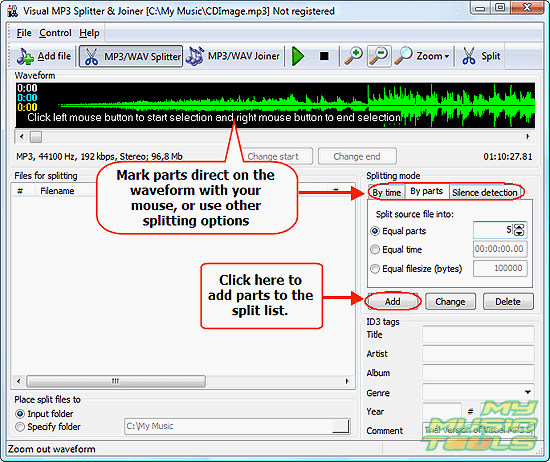
After marking a track, don't forget to click the highlighted "Add" button to add it to the split list.
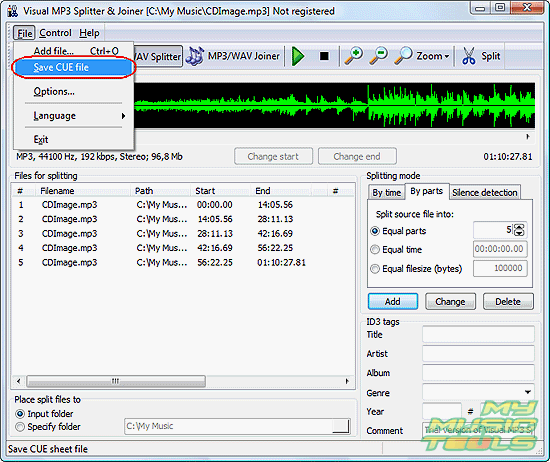
When all tracks are added, click "File", select "Save CUE file".
A usual "Save as" dialog will be shown. Enter some name for your CUE sheet (usually CUE sheets bear the same names as their main audio files, except for the extension), hit "Save".
Now you can burn your album to Audio CD with a proper tracks system.
The trial version of Visual MP3 Splitter & Joiner creates maximum 5 tracks per file. If you are satisfied with the functionality and quality, you can register the software online and unlock it with provided data.
The program can also be used as a CUE splitter, which means that you can load an existing CUE file into it and split your audio.


Search
Related
- How to split an audio file into equal parts?
- How to join WAV files?
- Easy MP3 Joiner 5.0 - Merge Your Audio Easily
- How to split APE files?
- How to create MP3 ringtones?
- How to merge MP3 files and keep the original quality?
- How to split WAV by CUE?
- MP3 splitter with batch mode support
- How to join MP3 files?
- How do I create a CUE sheet?
- How do I split MP3 file using silence detection?
- How do I cut MP3 album using CUE sheet?
- Easy MP3 Cutter 2.4 review
- Visual MP3 Splitter & Joiner 5.1 review
Ask our expert
- How to share screen videos online?
- How to sort duplicate music files by ID3 tags?
- How to get quick updates on movies by director?
- How to convert multiple MIDI files into an MP3?
- How to rotate videos?
- How to convert WMA to WAV?
- How to play MIDIs on an iPhone?
- How to split an audio file into equal parts?
- How to split m4b audiobooks into chapters for free?
- How to convert videos for You Tube?
