




How do I improve quality of videos and old movies?
Introduction.
Most people have different kinds of videos or older movies that are not quite fit for watching: the quality is bad (either initially, or because of the age of the media, if you take a video cassette), there is some noise, the picture is blurry, or dark etc. However, they keep the movie in their collection simply because it's too valuable, and there is no way to obtain a better copy.
The situation is pretty usual... which means that there should be solutions.
We will talk about one of them. EnhanceMovie is a simple and yet powerful tool to improve quality of videos.
Step 1: Download and install the program.
Download EnhanceMovie to a known location. Start setup package by double-clicking it and follow the on-screen instructions to install the application.
Step 2: Start the program. Open your video file.
Start the video enhancer program. The main window appears:
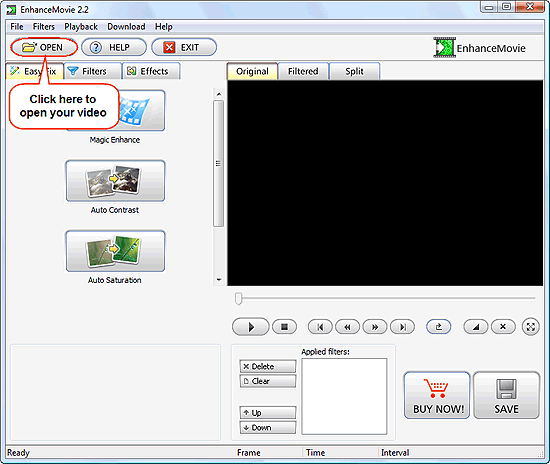
Click the "OPEN" button on the toolbar. It will invoke a usual "Open" system dialog. Browse to the location of your video file, select the file, click "Open".
The video will be loaded to the program. This process takes virtually no time.
Step 3: Play with filters. Save the file with the adjusted quality.
By default, the "Easy Fix" tab is shown on the left pane. By clicking "Magic Enhance" button you can make a quick adjustment suitable for most videos.
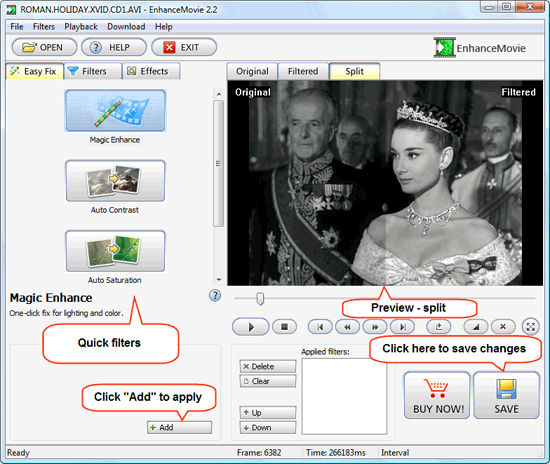
If the adjustment is sufficient, just click "Add" in the lower part of the window, then save the changes by clicking the "SAVE" button.
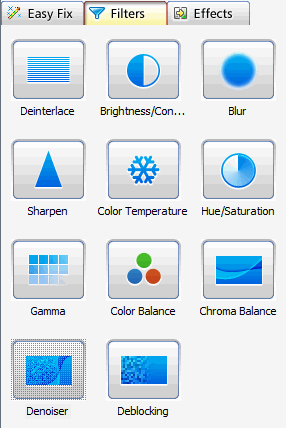
However, the program allows you to apply many filters at once, to fine tune the picture the way you want it. Add the required filters one by one to the "Applied filters" list. There are many filters available, just click "Filters" tab on the left pane:
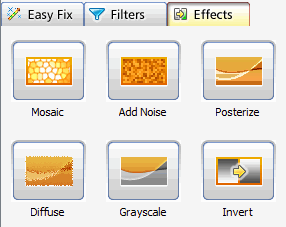
Also, you can add a number of effects to your video:
The trial version of EnhanceMovie adds a logo to the enhanced videos. You can remove this restriction with your personal registration data after purchasing.


Search
Related
- How to share screen videos online?
- How to rotate videos?
- How to capture video?
- How do I convert AVI to Zune?
- Movavi VideoSuite 4.4 review
- How to record a screen video?
- How to make a video tutorial?
 How to add a watermark to your video?
- How to fix a blurred video?
- How to increase brightness of a dark video?
- How do I combine AVI episodes into a full-length professional looking movie?
- How do I stay anonymous in a webcam chat?
- How do I improve quality of videos and old movies?
- AVS Video Editor 3.4 review
- MOVAVI Releases EnhanceMovie 2.0
- MOVAVI Releases EnhanceMovie 1.3
- How to play MKV file?
- How to play any video?
Ask our expert
- How to share screen videos online?
- How to sort duplicate music files by ID3 tags?
- How to get quick updates on movies by director?
- How to convert multiple MIDI files into an MP3?
- How to rotate videos?
- How to convert WMA to WAV?
- How to play MIDIs on an iPhone?
- How to split an audio file into equal parts?
- How to split m4b audiobooks into chapters for free?
- How to convert videos for You Tube?
