




How do I record voice conversations without recording silence?
It is possible to record all audio activity on a computer. This may be useful for capturing interesting internet radio shows, for recording important talks and conferences over the internet, for any other thing that includes computer and audio. But computers allow you to do even more nowadays. Using an adapter, you can connect a sound card of your computer to telephone line and record voice conversations. If you skip all the silence between conversations, you will save much space on your hard disk.
We will consider Sound Snooper - a small and easy-to-use program that takes practically no system resources and effectively records any audio activity while skipping pauses.
Step 1: Download and install the program.
Download Sound Snooper to a known location. Run setup and follow on-screen instructions to install the application.
Step 2: Launch the program. Set output folder and timeouts. Ready.
Launch Sound Snooper. The program's main window will appear:
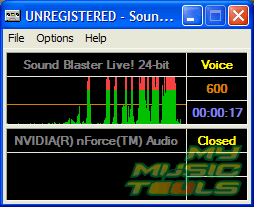
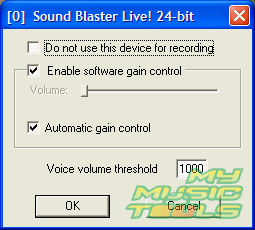
As you see, the voice capturing tool doesn't need special settings, it starts to work immediately. It also monitors all sound cards that it finds on the computer. I have disabled my built-in sound card by clicking "Options" menu and selecting the sound card from the list, than checking the corresponding option.
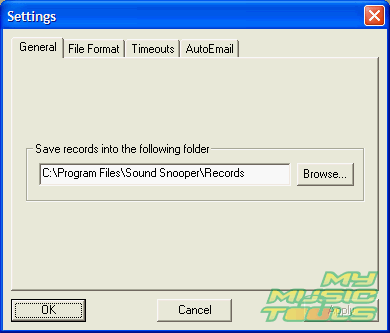
By default Sound Snooper puts recorded files into its own folder. If you want to change this, click "Options" - "Settings...". On "General" tab, select output path:
Yet another thing to consider is timeout settings:
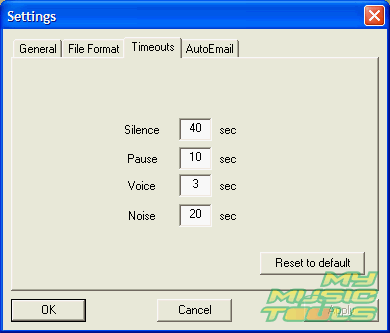
As we see, the program starts recording not immediately, but with a 3 seconds delay. You can increase or decrease the delay, but if the delay is too short, the program will produce a small file for every event, even for short and unimportant ones.
Sound Snooper installs itself as an audio recorder service and monitors audio events even if the main window is closed. You can stop the service by selecting "Options" - "Service" - "Stop".
The program is able to email resulting files to a specified account, which may be useful for monitoring telephone lines in your office while nobody is there. Just set your address on "AutoEmail" tab.


Search
Related
Ask our expert
- How to share screen videos online?
- How to sort duplicate music files by ID3 tags?
- How to get quick updates on movies by director?
- How to convert multiple MIDI files into an MP3?
- How to rotate videos?
- How to convert WMA to WAV?
- How to play MIDIs on an iPhone?
- How to split an audio file into equal parts?
- How to split m4b audiobooks into chapters for free?
- How to convert videos for You Tube?
