




How to burn karaoke CD?
Introduction.
Most people love singing. Karaoke was invented as the entertainment that unleashes our natural inclination to sing and to be heard. Karaoke also allows you to hear yourself as if you were performing on a stage, which is a fascinating experience in itself. However, karaoke requires some background music. Typically it includes a system for displaying on-screen lyrics. So, a special sort of CD is required, a karaoke CD.
Most DVD and multimedia players can play back discs with karaoke songs and lyrics on your screen. So, we only need to learn how to burn a karaoke CD with our favorite songs. We will take Power CD+G Burner as the example of karaoke CD creator.
Step 1: Download and install the program.
Download Power CD+G Burner to a known location. Run setup and follow on-screen instructions to install the application.
Step 2: Start the program. Select music files to burn.
Launch Power CD+G Burner. The main window will be shown:
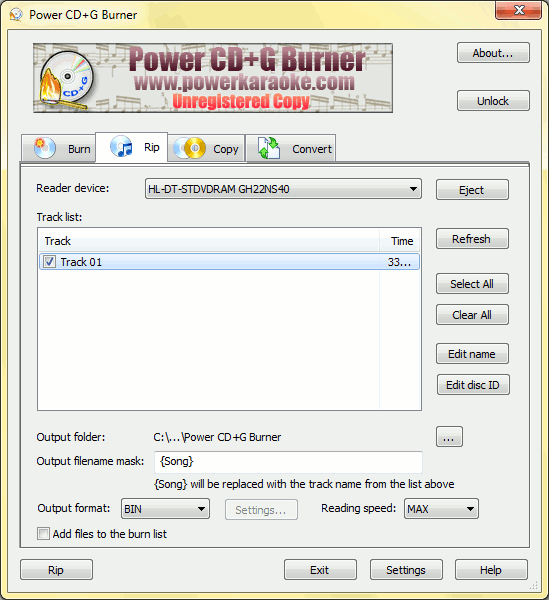
Just below the banner with the program's title, you can see four tabs. They are for different tasks: Burning karaoke CD, that we are going to do now; Ripping CD, creating the backup copy of your existing karaoke disc to the hard drive; Copy, creating the duplicate of your CD with karaoke songs; and Convert your CDG and MP3 files.
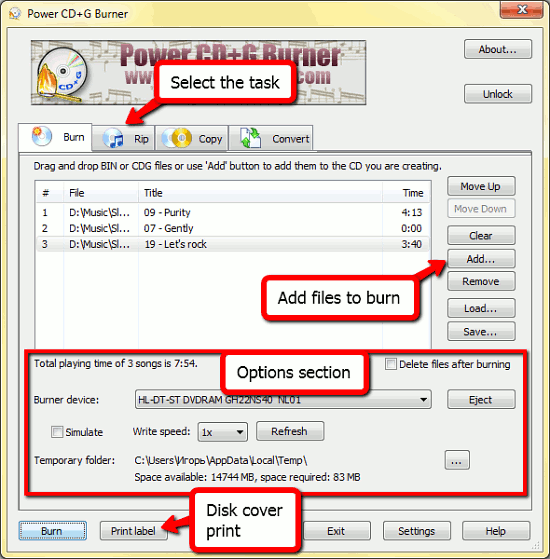
For our example, we select the "Burn" tab. Click "Add" and select CDG, KMA, MCG, BIN files that you'd like to burn to your CD. They can be from different folders, and you can add many of them at once by selecting with the "Ctrl" key pressed. The files will be added to the list.
Now we can adjust some settings: there are several options at the bottom of the window. You can choose to delete the source files after burning or select another CD drive, if there are several ones on your system. Also the folder for temporary files is specified here and a sleeve for the karaoke CD can be printed.
One of the interesting features of Power CD+G Burner is the ability to automatically search for missing ID3 tags on the internet using the FreeDB.org music database. So you will never have to recall who the artist is or what the name of the "audio-38.mp3" file was. All your karaoke collection will be organized in few moments.
Finally click "Burn" to start burning the karaoke CD and wait for the process to finish.
The trial version of Power CD+G Burner can burn only first 5 minutes of only 5 tracks to the CD. If you'd like to rip and convert more than 5 files, you can register the program and remove all limitations.

Search
Related
Ask our expert
- How to share screen videos online?
- How to sort duplicate music files by ID3 tags?
- How to get quick updates on movies by director?
- How to convert multiple MIDI files into an MP3?
- How to rotate videos?
- How to convert WMA to WAV?
- How to play MIDIs on an iPhone?
- How to split an audio file into equal parts?
- How to split m4b audiobooks into chapters for free?
- How to convert videos for You Tube?
