




How to convert DVD to MP4?
Introduction.
MP4 is one of the most popular container formats for both audio and video streams. It is recognized by quite a number of devices, including iPod, iPhone, Sony PSP, and many others. It is also a good choice for backing up DVD videos, as the video codecs used for compressing video data (for example, H.264) allow reducing size of the movie without visible quality losses.
We will discuss a simple way to rip DVD to MP4 format with Movavi Video Converter.
Step 1: Download and install the program.
Download Movavi Video Converter to a known location. Run setup and follow on-screen instructions to install the application.
Step 2: Start the program. Open DVD video to rip.
Launch Movavi Video Converter. The main window will be shown:
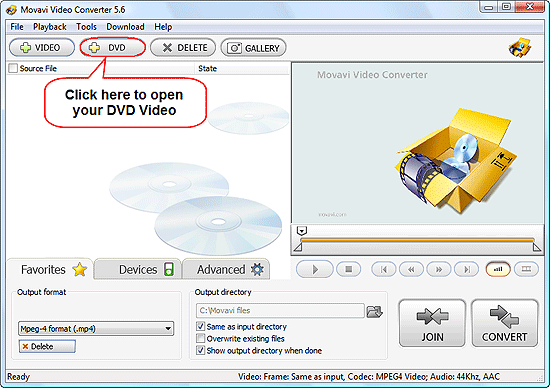
Insert your DVD video into DVD reader device, let the latter recognize the disc. Click "+ DVD" on the toolbar.
This will open a usual "Browse" dialog. Scroll to your DVD device and select it.
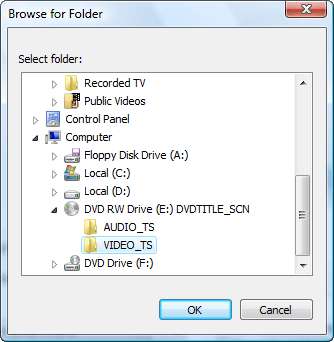
"VIDEO_TS" folder will be automatically selected. Click "OK".
Step 3: Rip your DVD to MP4.
The DVD will be scanned, and available titles will be added to the conversion list. If there are more than one title on the DVD, you can uncheck the ones that you don't want to convert, or just let the program convert every title (1).
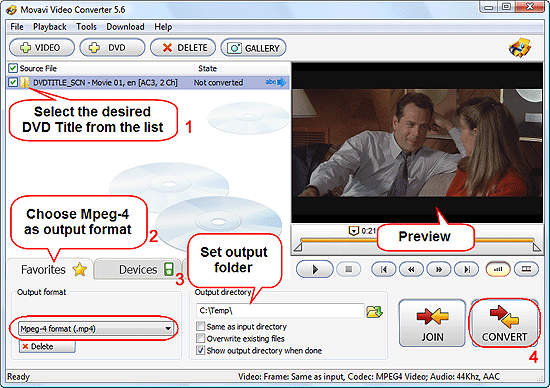
In the lower part of the program, select the "Favorites" tab. Then choose "Mpeg-4 format (.mp4)" from the dropdown list in the "Output format" area (2).
A bit to the right, set a folder where the converted files should be saved (3). Uncheck "Same as input directory" (if checked).
Finally, click "CONVERT" in the right lower corner of the program to start ripping the DVD (4).
The trial version of Movavi Video Converter is able to convert only 30% of a title. If you are satisfied with the functionality and features, you can register your copy online (or using any other method) and unlock it with the provided data.


Search
Related
- How to convert videos for You Tube?
- How to convert a video file with subtitles?
- How to convert video for Android?
- How to convert MKV to DVD?
- How to convert TS to AVI?
- How to convert AVI to WMV?
- How to convert AVI to FLV?
- How to convert MKV to MP4?
- How to convert DVD to MKV?
- How to convert MKV to AVI?
- How do I convert to DVD?
- How to convert DVD to MP4?
- How to convert MOV to AVI?
- How to convert AVI to MOV?
- How to convert MP4 to AVI?
- How to merge video files?
- How do I convert AVI to PSP format?
- How do I convert AVI to 3GP?
- How do I convert WMV to AVI?
- How do I convert video to flash?
- ConvertMovie 4.0 review
- Imtoo 3GP Video Converter 3.1 review
- How to convert a video file into the 3GP format?
- Xilisoft 3GP Video Converter 2.1 review
- Videozilla review
- How do I convert MTS to AVI?
Ask our expert
- How to share screen videos online?
- How to sort duplicate music files by ID3 tags?
- How to get quick updates on movies by director?
- How to convert multiple MIDI files into an MP3?
- How to rotate videos?
- How to convert WMA to WAV?
- How to play MIDIs on an iPhone?
- How to split an audio file into equal parts?
- How to split m4b audiobooks into chapters for free?
- How to convert videos for You Tube?
