




How to convert a whole folder of audio files into the OGG format?
1. Launch AudioConverter Studio.
2. When AudioConverter Studio Wizard opens, activate the check box "Convert whole folder".
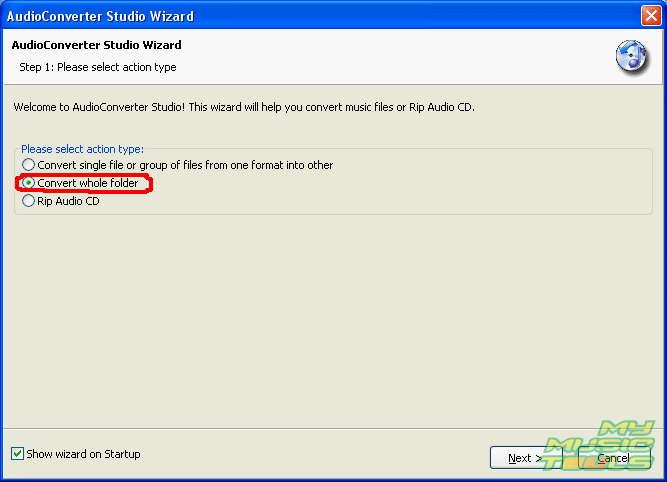
3. Press the button "Next".

4. In the dialog box "Browse for Folder" select the audio files folder you need and press the button "Ok".
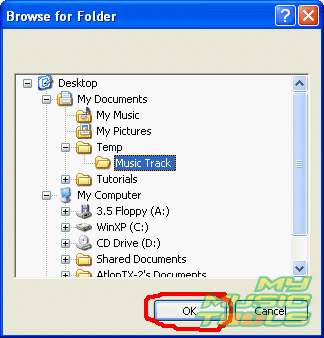
5. AudioConverter Studio Wizard will save the path to this folder. Now press the button "Next".
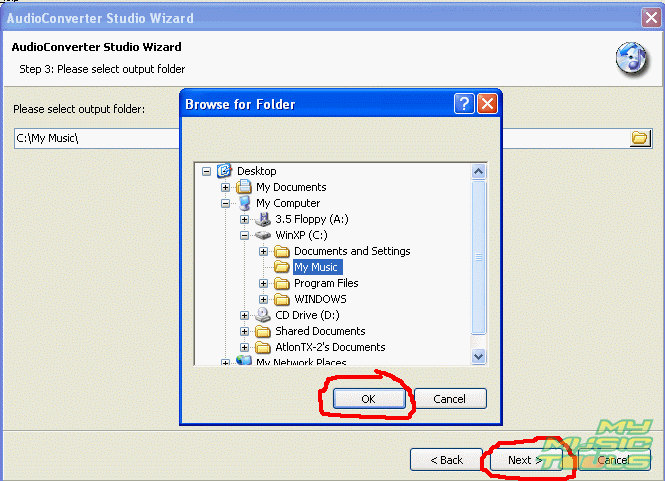
6. In the next dialog box of AudioConverter Studio Wizard select the target folder for the converted files and click on it. Then press "Ok" and "Next".
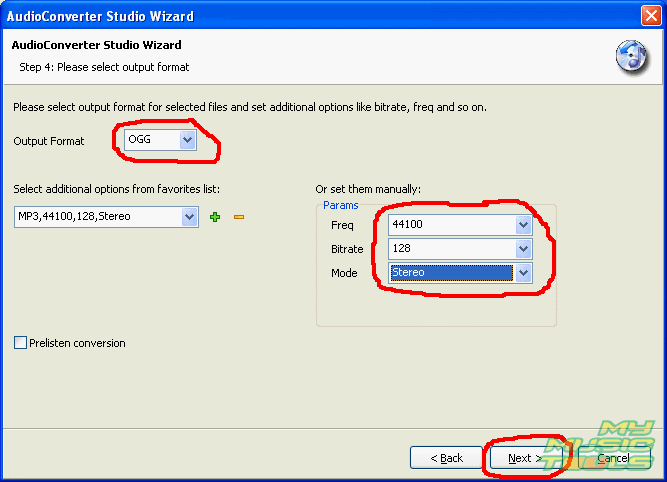
7. In the next window of AudioConverter Studio Wizard select the OGG format and set additional options for the converted files. The program AudioConverter Studio supports such formats as MP3, WMA, OGG, WAV, FLAC, MPC and their corresponding settings. Having adjusted the settings press the button "Next".
8. The next window of AudioConverter contains information about the selected options of the audio files conversion. Click on "Finish".

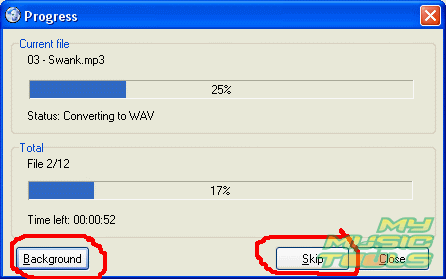
9. After you press the button "Finish", the conversion dialog box emerges. Use the button "Skip" if you want to skip conversion of a file; the program will continue converting with the next file. The button "Close" stops the conversion process completely, while the button "Background" minimizes the conversion window to the system tray; the conversion will continue in the background mode.


Search
Related
- How to convert WMA to WAV?
- How to convert FLAC to WAV?
- How to convert APE to FLAC?
- How to rip Audio CD to APE?
- How to rip Audio CD to FLAC?
- How to convert MP3 to WAV?
- How to convert WMA to MP3?
- How do I convert MPC to MP3?
- How to change bitrate of MP3 files?
- How to convert WAV to MP3?
- How to convert CDA to MP3?
- How to convert OGG to MP3?
- How do I convert APE to MP3?
- How do I convert FLAC to MP3?
- How to convert a whole folder of audio files into the OGG format?
- AudioConverter Studio 6.0 review
- AudioConverter Studio review
Ask our expert
- How to share screen videos online?
- How to sort duplicate music files by ID3 tags?
- How to get quick updates on movies by director?
- How to convert multiple MIDI files into an MP3?
- How to rotate videos?
- How to convert WMA to WAV?
- How to play MIDIs on an iPhone?
- How to split an audio file into equal parts?
- How to split m4b audiobooks into chapters for free?
- How to convert videos for You Tube?
