




How to convert M4a to MP3 for free?
Introduction.
M4A is a container format for audio files. It is based on Apple's Quicktime container format and is a part of MPEG-4. As a rule, M4A contains only audio, but the format itself is identical to MP4 that can contain video as well. Among slight variations of the same format are M4V (for video), M4B (audio books) and some others.
M4A audio files are pretty popular at computers and other devices from Apple. But players from other manufacturers may prefer a number of different formats. If you want your music to be readily played on any computer or other multimedia device, you may think about converting M4A files to even more popular and widely supported MP3 format.
We will discuss how to convert M4A to MP3 using a freeware tool, Free M4a to MP3 Converter.
Step 1: Download and install the program.
Download Free M4a to MP3 Converter to a known location. Run setup and follow on-screen instructions to install the application.
Step 2: Start the program. Select M4A files to convert.
Launch Free M4a to MP3 Converter. The main window will appear:
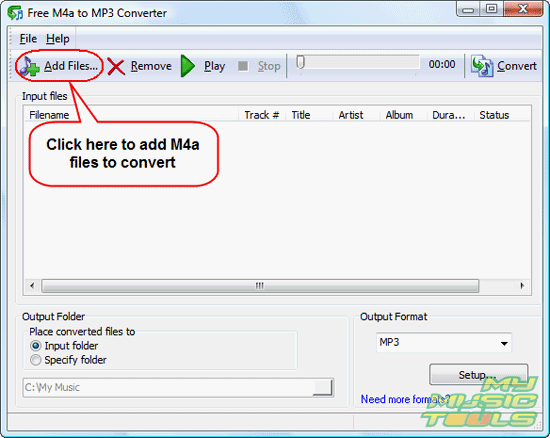
Click the leftmost "Add files" button on the toolbar to invoke a usual "Open" dialog.
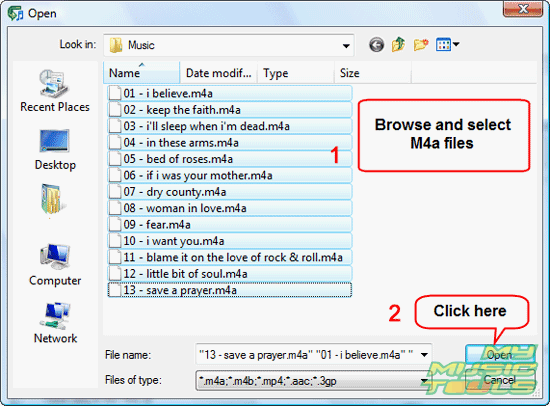
In the new window, browse to the location where your M4A files are stored, select those ones that you need to convert to MP3, click "Open".
Step 3: Convert M4A to MP3.
The files will be added to the conversion list. Now you can preview them by selecting a file from the list and clicking the green triangle on the toolbar ("Play"). To stop playing, click the black quadrate ("Stop").
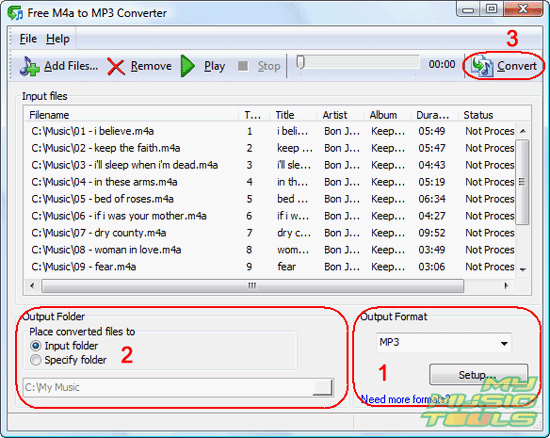
Free M4A to MP3 Converter can read M4A tags (i.e. information about title, artist, album etc. that is stored inside each file). This information is shown in the corresponding columns. If tags of your M4A files are not empty, they will be transferred to converted MP3 files.
In the "Output format" area (1), set MP3 as output format. Additionally you can adjust MP3 settings by clicking the "Setup..." button in the same area:
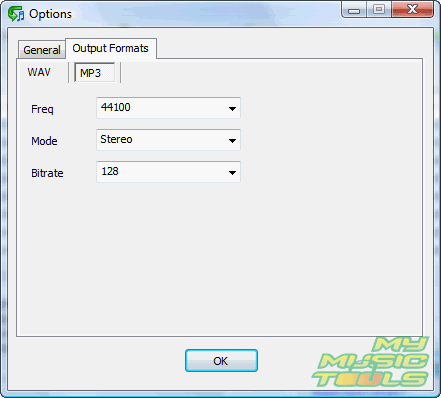
By default the M4a converter uses 44KHz, 128 Kbit/s Stereo MP3. These settings are good for most cases. If you need to reduce quality (to get smaller files) or, vice versa, get better quality, adjust the settings. The whole ranges of MP3 bit rates and sample rates (frequency) are supported.
Back to the earlier screen shot. In the "Output folder" area (2), set a folder where output files (MP3s) should be saved. You can use the same folder where your M4A files are stored, or select any other folder on your computer. You should have necessary permissions on the folder (especially important for Windows Vista users).
Finally, click "Convert" on the toolbar (3) to convert M4A to MP3.

Search
Related
- How to split m4b audiobooks into chapters for free?
- How to convert M4A to WAV for free?
- Convert M4b to MP3 and cut by chapters
- How to convert ALAC to MP3?
- How to convert M4b to MP3 for free?
- How to convert AAC to MP3 for free?
- How to convert M4a to MP3 for free?
- How to convert MP4 to MP3?
- How do I convert MP3 to M4a?
- 4Musics Multiformat Converter 1.55 review
- Audio Conversion Wizard 1.8 review
- How to convert RM to MP3?
Ask our expert
- How to share screen videos online?
- How to sort duplicate music files by ID3 tags?
- How to get quick updates on movies by director?
- How to convert multiple MIDI files into an MP3?
- How to rotate videos?
- How to convert WMA to WAV?
- How to play MIDIs on an iPhone?
- How to split an audio file into equal parts?
- How to split m4b audiobooks into chapters for free?
- How to convert videos for You Tube?
