




How to convert MIDI to CDA?
Introduction.
CDA stands for CD Audio. It's not an audio format, but rather a format of physical medium, so you can't get a program that converts MIDI to CDA. CDA is a shortcut created by the operating system to provide an easy access to audio tracks.
Thus what you need is creating an Audio CD from your MIDI files. This includes two different tasks: converting MIDI to WAV or some other suitable audio format (MIDI is not an audio format either) and burning the resulting files to an empty CD. You can burn MIDI files to a CD directly, but you won't be able to play them on CD players and other devices later.
When converting MIDI to WAV, the two main things in question are quality and speed. You can answer them both by using MIDI Converter Studio. This program supports SoundFonts, which makes MIDI conversion quick and allows to produce fantastic sound even on an average sound card.
Step 1: Download and install the program.
Download MIDI Converter Studio to a known location. Run the downloaded setup package and follow on-screen instructions to install the program.
Step 2: Start the program. Convert MIDI files.
Launch MIDI Converter Studio. On its toolbar, click the leftmost button:
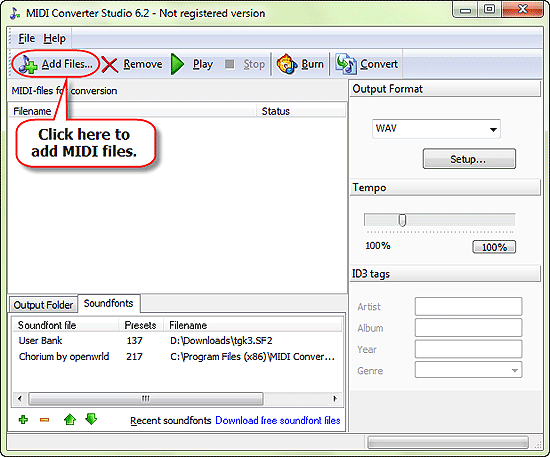
This will invoke a usual "Open" dialog. Browse to the location where you MIDI files are stored, select those that you want to convert to CDA, click "Open".
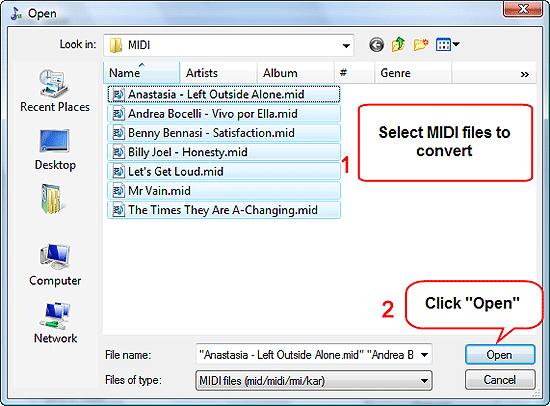
The files will be added to the conversion list. Now you can preview them by selecting a file from the list and clicking "Play" on the toolbar.
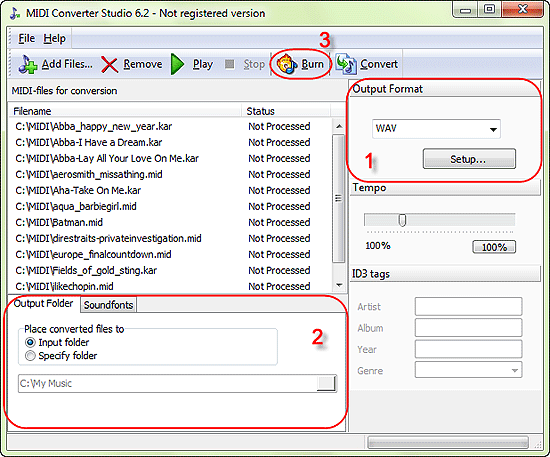
In the "Output format" area (1), select WAV as the output format.
For our example, we choose to save converted file into the same folder where our MIDI files are stored. You can do the same in the "Output folder" area (2), or select any other folder on your computer.
Finally, click "Burn" (3).
The program starts converting MIDI to WAV. All buttons become disabled.
We could convert to any other format supported by MIDI Converter Studio, for example, to MP3. However, as we need the files only to burn them to a CD, there's no need to use other formats. Conversion to WAV is quicker, and WAV is a lossless format, which is another advantage.
Once processed, files in the list change their status from "Not Processed" to "Processed". Finally, MIDI Converter Studio shows a message telling that the process is finished. Don't close the message window yet.
The trial version of MIDI Converter Studio converts only 60 seconds of each file. If you are satisfied with the quality, you can register your copy and remove all limitations.
Step 3: Download and install the burner application.
In order to burn files, you need a burner application, i.e. a program that can burn CDs. MIDI Converter Studio cannot do that directly, but it offers a very easy way of burning Audio CDs, if combined with another program called Audio CD Burner Studio. This program is available as a full-featured demo. If you don't have it on your computer, download and install Audio CD Burner Studio.
Step 4: Burn MIDI to Audio CD.
After installing Audio CD Burner Studio, switch back to MIDI Converter Studio. It is still showing us the result message:
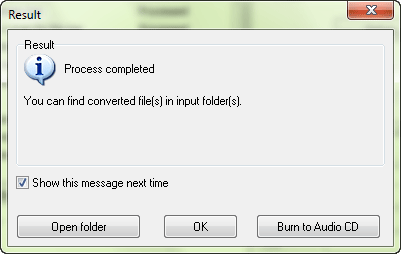
Click "OK" to close the window. Audio CD Burner Studio will be started automatically:
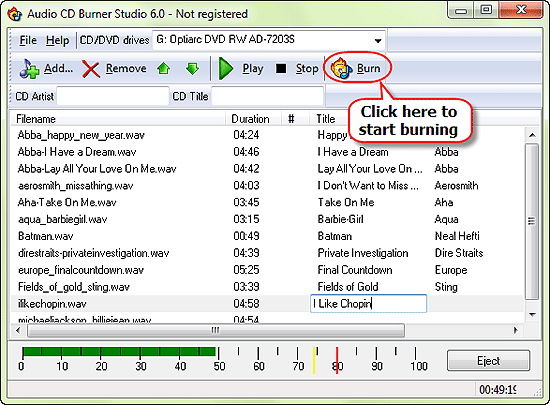
Its track list will be populated with the converted files. The program will automatically detect your burning device and select it. So, in most cases it is sufficient to insert an empty CD-R into your burner and click the "Burn" button on the toolbar of Audio CD Burner Studio.
Please make sure that the total length of your CD doesn't exceed the capacity of your CD-R. A typical CD-R can contain up to 80 minutes of music.
Optionally you can enter some information about your MIDI files, including title, artist etc. This information will be written as CD-Text and can be shown later by players that support the feature.


Search
Related
- How to convert multiple MIDI files into an MP3?
- How to play MIDIs on an iPhone?
- Play MIDI files on your iPod!
- How do I convert MIDI to WAV?
- How to convert MIDI to OGG?
- How to convert MIDI to WAV?
- How to convert MIDI to CDA?
- How to convert MIDI to MP3 using several SoundFonts?
- How to convert MIDI to WMA?
 How to convert MIDI to MP3
- MIDI to MP3 converter with ID3 tags support
- MIDI to Ringtone Converter
- How do I convert KAR to MP3?
- How do I convert MIDI to MP3?
- Fast MIDI to MP3 Converter 5.6 review
- How to convert a mid to mp3?
- ManiacTools Releases MIDI Converter Studio 4.6
- How do I edit MIDI files?
- WIDI Recognition System Professional 3.3 Review
- How do I convert MP3 to MIDI?
- Able MIDI Editor 1.3 review
Ask our expert
- How to share screen videos online?
- How to sort duplicate music files by ID3 tags?
- How to get quick updates on movies by director?
- How to convert multiple MIDI files into an MP3?
- How to rotate videos?
- How to convert WMA to WAV?
- How to play MIDIs on an iPhone?
- How to split an audio file into equal parts?
- How to split m4b audiobooks into chapters for free?
- How to convert videos for You Tube?
