




How to convert MP4 to AVI?
Introduction.
MP4 is a popular container format for audio and video data. MP4 files can be audio-only, which is not uncommon, but we will talk about MP4 that contain both audio and video streams. The format is promoted largely by Apple, all products from Apple (iPod, iPhone, iTunes etc.) default to it.
AVI is another container format developed and promoted by Microsoft. Its popularity is so great that most people think AVI, if a video file is mentioned. The format is also supported by hardware DVD players (those with DivX logo).
You can convert MP4 to AVI with a tool like Movavi Video Converter.
Step 1: Download and install the program.
Download Movavi Video Converter to a known location. Start the setup and follow on-screen instructions to install the application.
Step 2: Start the program. Select MP4 videos to convert.
Launch Movavi Video Converter.
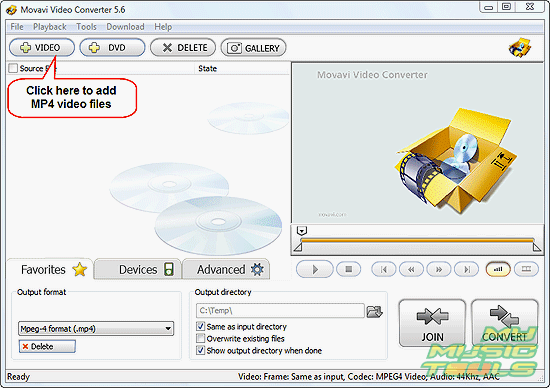
Click "+ VIDEO" on the toolbar to invoke a usual "Open" dialog.
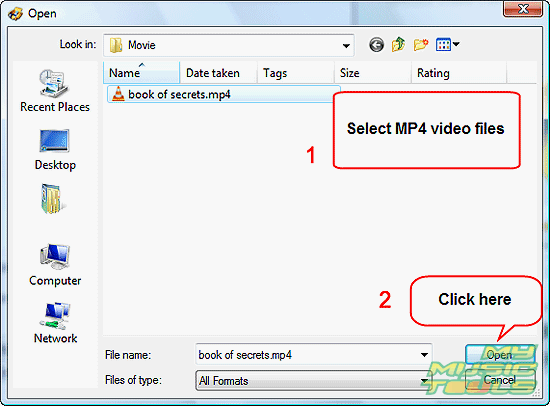
Browse to the folder or device where your MP4 videos are stored. Select files to convert to AVI. Click "Open".
Step 3: Set output format and folder. Convert MP4 to AVI.
The files will be added to the conversion list of the MP4 converter. You can add further files by repeating the step 2.
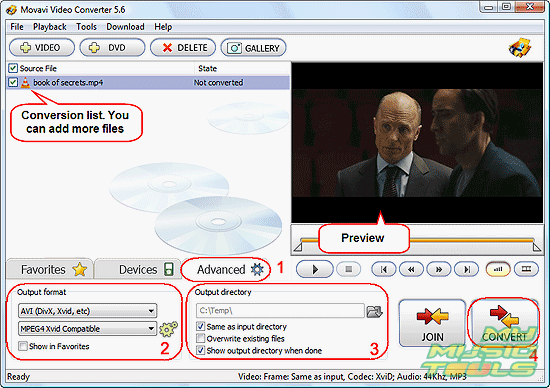
If you want to convert only a part of the video, you can click the video in the conversion list and use controls in the preview area to set start/end time.
Click the "Advanced" tab in the lower part of the window (1). In the "Output format" area, select "AVI (DivX, Xvid, etc)" from the first dropdown menu (2). By default, the program takes settings for audio and video quality from the source file. If you need to fine tune the settings, you can click the cogwheel icon on the right in the same area.
As next, define a folder where you want to save the converted AVI files (3). You can use the same folder where the source files are, or just enter any other folder on your computer. If you have problems saving files, check your permissions and ownership on the output folder.
Finally, click "CONVERT" in the right lower corner. The program will start converting MP4 to AVI.
The trial version of Movavi Video Converter converts only 30% of a file. If you are satisfied with the quality and features, you can register the program and unlock it with the provided data.


Search
Related
- How to convert videos for You Tube?
- How to convert a video file with subtitles?
- How to convert video for Android?
- How to convert MKV to DVD?
- How to convert TS to AVI?
- How to convert AVI to WMV?
- How to convert AVI to FLV?
- How to convert MKV to MP4?
- How to convert DVD to MKV?
- How to convert MKV to AVI?
- How do I convert to DVD?
- How to convert DVD to MP4?
- How to convert MOV to AVI?
- How to convert AVI to MOV?
- How to convert MP4 to AVI?
- How to merge video files?
- How do I convert AVI to PSP format?
- How do I convert AVI to 3GP?
- How do I convert WMV to AVI?
- How do I convert video to flash?
- ConvertMovie 4.0 review
- Imtoo 3GP Video Converter 3.1 review
- How to convert a video file into the 3GP format?
- Xilisoft 3GP Video Converter 2.1 review
- Videozilla review
- How do I convert MTS to AVI?
Ask our expert
- How to share screen videos online?
- How to sort duplicate music files by ID3 tags?
- How to get quick updates on movies by director?
- How to convert multiple MIDI files into an MP3?
- How to rotate videos?
- How to convert WMA to WAV?
- How to play MIDIs on an iPhone?
- How to split an audio file into equal parts?
- How to split m4b audiobooks into chapters for free?
- How to convert videos for You Tube?
