




How to convert a video file into the 3GP format?
1. Launch ImTOO 3GP Video Converter.
2. Press the button "Add" to select a video file for conversion.

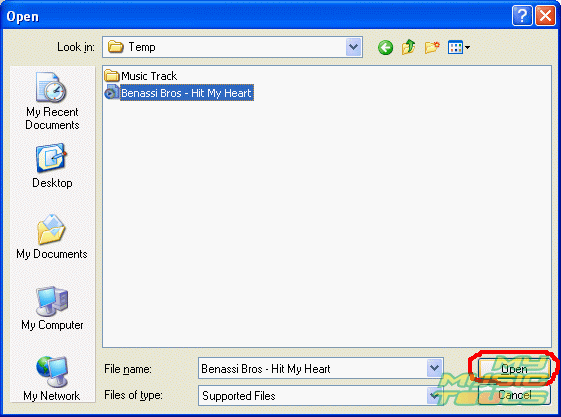
3. In the emerging "Open" dialog box select the video file that you want to convert. Press the button "Open"
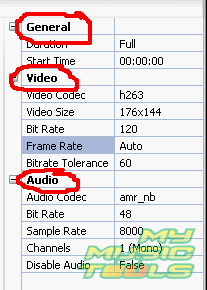
4. The selected file will be added to the conversion list. In the program window of ImTOO 3GP Video Converter select the file for conversion. Then go to the video file settings in the right upper corner of the program window. In the "General" tab you can define the starting video frame for conversion in minutes. It means that the program allows converting not only the whole file but a portion of it as well. In the "Video" tab select a codec, the size of the resulting video, bit rate of the video track and other parameters for the output video file. In the "Audio" tab you can adjust parameters for the output audio stream.
5. Having adjusted all the above-mentioned settings for the output video file, select a directory for the saved file. First choose the file type from the fall-out menu, in our case it is *.3gp; then select a directory for the file using the button "Browse..."

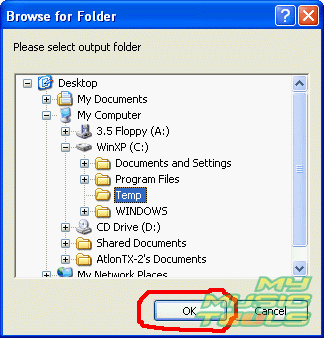
6. In the "Browse for Folder" dialog box select the required directory and press the button "Ok".
7. When all the settings for the output video file are adjusted, start conversion by pressing the button "Encode". Use the buttons "Pause" and "Stop" to control the conversion process.



Search
Related
- How to convert videos for You Tube?
- How to convert a video file with subtitles?
- How to convert video for Android?
- How to convert MKV to DVD?
- How to convert TS to AVI?
- How to convert AVI to WMV?
- How to convert AVI to FLV?
- How to convert MKV to MP4?
- How to convert DVD to MKV?
- How to convert MKV to AVI?
- How do I convert to DVD?
- How to convert DVD to MP4?
- How to convert MOV to AVI?
- How to convert AVI to MOV?
- How to convert MP4 to AVI?
- How to merge video files?
- How do I convert AVI to PSP format?
- How do I convert AVI to 3GP?
- How do I convert WMV to AVI?
- How do I convert video to flash?
- ConvertMovie 4.0 review
- Imtoo 3GP Video Converter 3.1 review
- How to convert a video file into the 3GP format?
- Xilisoft 3GP Video Converter 2.1 review
- Videozilla review
- How do I convert MTS to AVI?
Ask our expert
- How to share screen videos online?
- How to sort duplicate music files by ID3 tags?
- How to get quick updates on movies by director?
- How to convert multiple MIDI files into an MP3?
- How to rotate videos?
- How to convert WMA to WAV?
- How to play MIDIs on an iPhone?
- How to split an audio file into equal parts?
- How to split m4b audiobooks into chapters for free?
- How to convert videos for You Tube?
