




How to record phone calls?
Introduction.
Sometimes you may want to record a phone call, which is where special software may come in handy. Everyone knows that computer can be connected to a phone line (using a modem), and this can be very convenient. You can let your computer record all phone calls (or just the ones you choose), turn it into a powerful answering machine etc.
In this article we will discuss how to record phone calls using a special program, Phone Call Recorder.
Step 1: Download and install the program.
Download Phone Call Recorder to a known location. Run setup and follow on-screen instructions to install the application.
Step 2: Start the program. Adjust recording settings.
Launch Phone Call Recorder. The main window will be shown:
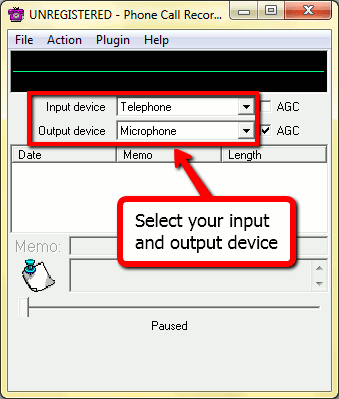
From the drop-down lists choose your input and output devices. Suppose we are calling using a microphone, so select "Microphone" as the input device.
Now let's check what the phone call recorder can do. Click "File" - "Preferences". A new window pops up. It has a lot of tabs, each one is responsible for certain logically related settings, but we will review only the most important tabs now.
On the "Recording" tab we can choose to automatically record calls.
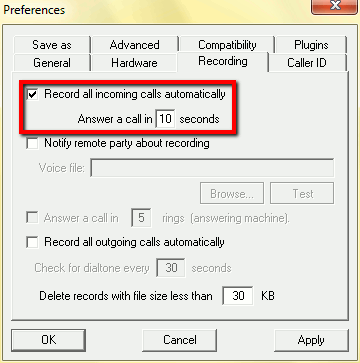
Enable other options that you need and switch to the "Save as" tab. Here you can select the output format and adjust its quality for saving phone call recordings.
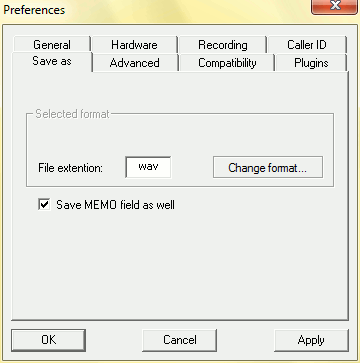
If you'd like to alter the filename format, click the "Change format" button. There you will find advanced format options.
Click "OK" to return to the main window.
Step 3: Phone call recording.
Everything is set up to record phone calls that we make or receive. Let's dial some number and test the feature. Click "File" - "Dial number"
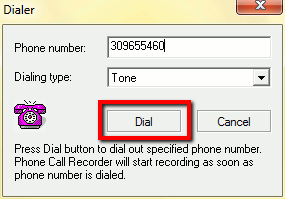
In the new window, enter a number of your acquaintance, choose dialing type (if necessary) and press "Dial". Click "Action" - "Record" on the toolbar to start recording your phone call.
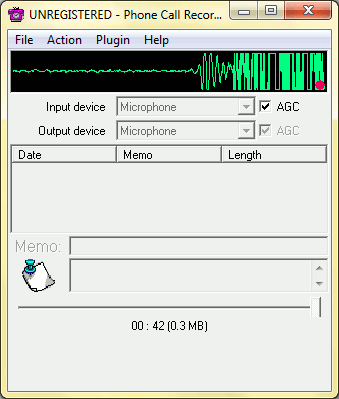
The waveform starts to show some activity, and the program records everything you hear or say. After the call ends (you can also click "Actions" - "Stop"), the saved audio file will appear in the list. You can add some notes by selecting it and entering any text into the "Memo" field.
The extended registered version provides additional functionality with "smart phone calls monitoring", enabling hotkeys and other bonuses. If you like Phone Call Recorder, you can register it and start using without any limitations.


Search
Related
-
[an error occurred while processing this directive]
Ask our expert
- How to share screen videos online?
- How to sort duplicate music files by ID3 tags?
- How to get quick updates on movies by director?
- How to convert multiple MIDI files into an MP3?
- How to rotate videos?
- How to convert WMA to WAV?
- How to play MIDIs on an iPhone?
- How to split an audio file into equal parts?
- How to split m4b audiobooks into chapters for free?
- How to convert videos for You Tube?
