




MP3 Tag Editor + Audio Converter + MP3 Splitter/Joiner + Duplicate Remover + MIDI Converter = 70% OFF
EN DE ES IT FR RU
Articles & Reviews

How to share screen videos online?- How to sort duplicate music files by ID3 tags?
- How to get quick updates on movies by director?
- How to convert multiple MIDI files into an MP3?
- How to rotate videos?
- How to convert WMA to WAV?
- How to play MIDIs on an iPhone?
- How to split an audio file into equal parts?
- How to split m4b audiobooks into chapters for free?
- How to convert videos for You Tube?
Recommended downloads
- in this category
- Easy MP3 Cutter
- Easy MP3 Joiner
- Visual MP3 Splitter & Joiner
- CD Wave Editor
Soft Description
CD Wave Editor 1.98
FROM: MiLo Software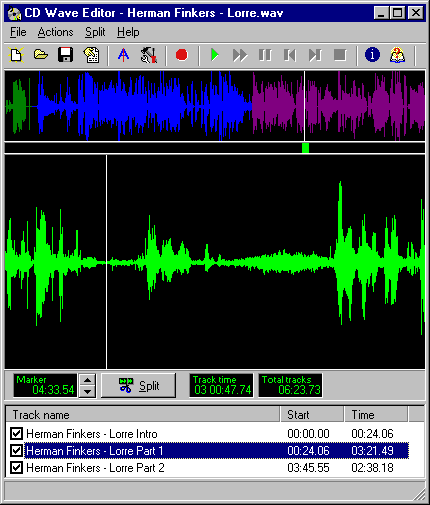
Transfer your favorite tape or LP to WAV/MP3 to save on the hard disk or burn.
Our rating: 

Size: 1230 KB
CD Wave Editor is a tool to record WAV files and split large WAV recordings into a number of smaller tracks using digital audio extraction. You need to follow five simple steps to transfer you favorite music album from LP, tape or other sources to CDR or save to the hard disk.
First of all you need to set up your audio equipment (tape desk, pick-up, etc.) and connect it to the computer's sound card. Then adjust volume and other settings (voice activated start, silence level, stop recording after the specified number of minutes and others) for your recording to achieve audio digitizing of the best quality. Now is everything ready to transfer your invaluable vinyl album or tape to the hard disk. Just hit the "recording" button and record LP to your computer.
The next step is to split the recording into tracks or songs using the auto-split function or manually by adding or deleting split points. You can also cut out silent parts or songs you do not need. The wave editor provides a built-in audio player and a VU meter, which will help you to identify cut points. The program color-codes the parts you've marked and allows you saving only the fragments that you need. If you don't want to save your files in the WAV format, CD Wave Editor will compress them for you to lossless FLAC or APE, or convert them to lossy VORBIS OGG or MP3 which can be played on most of the portable devices or uploaded to the web. The tracks you have now saved on your hard drive are ready to be burned with any appropriate CDR mastering.
You can use CD Wave as a basic audio recorder and editor to record and play back audio, and cut out segments to be saved. It can also be used as a CUE sheet editor for CDRWin.
CD Wave can read from WAV, FLAC and APE files, CD audio and digital or analog inputs through a soundcard. It supports all uncompressed audio formats up to 24-bit, at any sample rate and any number of channels (mono, stereo, quad, dolby 5.1). Try this smart sound recorder now!
First of all you need to set up your audio equipment (tape desk, pick-up, etc.) and connect it to the computer's sound card. Then adjust volume and other settings (voice activated start, silence level, stop recording after the specified number of minutes and others) for your recording to achieve audio digitizing of the best quality. Now is everything ready to transfer your invaluable vinyl album or tape to the hard disk. Just hit the "recording" button and record LP to your computer.
The next step is to split the recording into tracks or songs using the auto-split function or manually by adding or deleting split points. You can also cut out silent parts or songs you do not need. The wave editor provides a built-in audio player and a VU meter, which will help you to identify cut points. The program color-codes the parts you've marked and allows you saving only the fragments that you need. If you don't want to save your files in the WAV format, CD Wave Editor will compress them for you to lossless FLAC or APE, or convert them to lossy VORBIS OGG or MP3 which can be played on most of the portable devices or uploaded to the web. The tracks you have now saved on your hard drive are ready to be burned with any appropriate CDR mastering.
You can use CD Wave as a basic audio recorder and editor to record and play back audio, and cut out segments to be saved. It can also be used as a CUE sheet editor for CDRWin.
CD Wave can read from WAV, FLAC and APE files, CD audio and digital or analog inputs through a soundcard. It supports all uncompressed audio formats up to 24-bit, at any sample rate and any number of channels (mono, stereo, quad, dolby 5.1). Try this smart sound recorder now!
German review Spanish review Italian review French review Russian review

USER COMMENTS:
Great program for recording wav files from LPs and splitting tracks. Takes some effort to learn to do the job satisfactorily, but it's worth the effort. I first usedthis years ago, and at that time I felt it was easier to determine the optimum settings to get good results. Perhaps the earlier version had better help resources.
Dbldoppler
Dbldoppler
ALL MiLo Software SOFT:
CD Wave Editor 1.98 - Transfer your favorite tape or LP to WAV/MP3 to save on the hard disk or burn.
Related keywords:
wave editor
split wav
edit wav
audio editor
cut wave
cdwav
Search
Related
 Visual MP3 Splitter & Joiner
A handy software utility that can split and combine audio files. Cut MP3 fast and easy using a waveform without losses in quality. The program can merge several files into one large. Supports batch processing mode.
All categories
- All-In-One Jukebox
- Audio CD Burners
- Audio CD Rippers
- Audio Converters
- Audio Editors
- Audio Players
- Developers Kit
- DJ Tools
- DVD Rippers
- DVD Tools
- Flash Tools
- iPod Tools
- Karaoke Software
- Mac OS Tools
- Midi Tools
- Mobile Ringtone Tools
- Movie Organizers
- Music Management
- Radio & Broadcasting
- Recorders
- Rippers & Encoders
- Score Editors
- Splitter & Joiner
- Test Tools
- Utilities
- Video Converters
- Video Splitters & Joiners
- Video Tools
- Voice & Text
