




How do I convert MP3 to M4a?
MP3 is one of the most popular audio formats, you can find MP3 audio virtually everywhere: online, on CDs, even in movies (many videos use MP3 for their audio streams).
On the other hand, Apple seems to succeed in establishing an audio format of the "next generation", M4A. M4A is an extension for 'audio only' MP4 files, if some file doesn't contain video, it can be freely renamed from MP4 to M4A and vice versa without confusing media players. MP4 is a container format, which means that it can have both audio and video streams. The streams can use various codecs, for audio streams it's almost always AAC (but MP4 files may also contain MP3 streams). AAC (and therefore M4A) was designed to be the successor of MP3. It is preferred by Apple and very good supported by their devices like iPods, iPhones etc.
You can convert MP3 to M4A, or MP3 to M4B (the latter format is similar to M4A, but it is used mainly for audio books) with a tool like 4Musics Multiformat Converter.
Step 1: Download and install the program.
Download 4Musics Multiformat Converter to a known location. Run setup and follow on-screen instructions to install the application.
Step 2: Start the program. Select your MP3 files.
Launch 4Musics Multiformat Converter. Click the "Add" button on the toolbar.
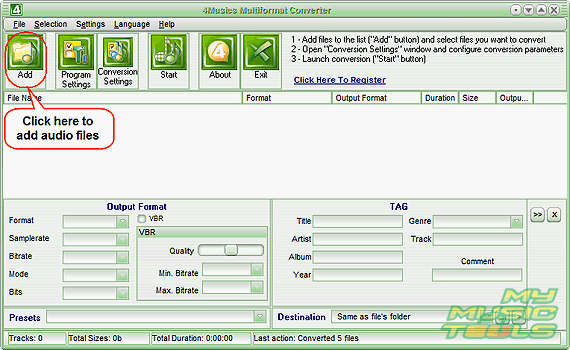
Select whether you want to convert single files, or a whole folder. For our demo we will convert single files.
A usual "Open" system dialog will appear. Browse to the folder where your MP3 files are stored, select those that you want to convert to M4A, click "Open".
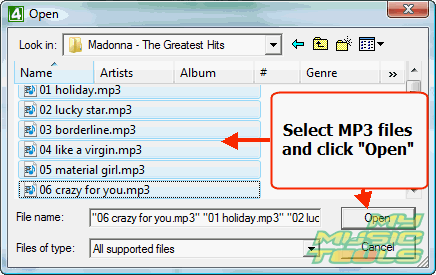
The files will be added to the conversion list.
Step 3: Set output format and folder. Convert your MP3 to M4A.
As the "Open" dialog disappears, we return to the main window.
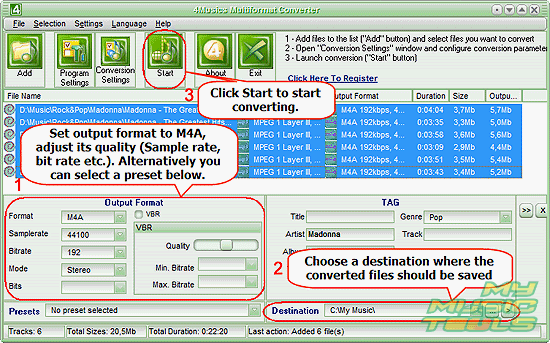
Make sure that the files are selected (if they aren't, click a file in the list and press "Ctrl" + "A" on your keyboard). In the "Output format" area (1), set "Format" to M4A and adjust quality settings (sample rate, bit rate, mode, VBR/CBR etc.).
Alternatively you can select a preset from the dropdown list right below the area.
As next, select some folder to save the converted M4A files. By default, the same folder where your input MP3 files are stored will be used. If you want to put the converted files into another folder, set it in the "Destination" field (2).
Finally, click "Start" to begin converting MP3 to M4A.


Search
Related
- How to split m4b audiobooks into chapters for free?
- How to convert M4A to WAV for free?
- Convert M4b to MP3 and cut by chapters
- How to convert ALAC to MP3?
- How to convert M4b to MP3 for free?
- How to convert AAC to MP3 for free?
- How to convert M4a to MP3 for free?
- How to convert MP4 to MP3?
- How do I convert MP3 to M4a?
- 4Musics Multiformat Converter 1.55 review
- Audio Conversion Wizard 1.8 review
- How to convert RM to MP3?
Ask our expert
- How to share screen videos online?
- How to sort duplicate music files by ID3 tags?
- How to get quick updates on movies by director?
- How to convert multiple MIDI files into an MP3?
- How to rotate videos?
- How to convert WMA to WAV?
- How to play MIDIs on an iPhone?
- How to split an audio file into equal parts?
- How to split m4b audiobooks into chapters for free?
- How to convert videos for You Tube?
