




How do I rip Audio CD to RM format?
Introduction.
RM is a proprietary container format designed and introduced by RealNetworks. RM files can wrap both audio and video. The format is highly popular on the internet, as it offers great flexibility. You can choose from very small file sizes suitable even for modems to high-quality audio and video. RM is well established and can be played on most operating systems.
To rip an Audio CD to RM, you need a program like CD to MP3 WAV Maker.
Step 1: Download and install the program.
Download CD to MP3 WAV Maker to a known location. Run setup and follow on-screen instructions to install the application.
Step 2: Launch the program. Insert Audio CD to rip.
There are two variants of this sequence. You can insert your CD first, and then start the program. The content of your CD will be shown immediately.
If the content isn't shown, it means that you have several CD/DVD devices. Just click "Settings" and in "CD General" section specify the device you have inserted your CD into.
Alternatively you can start the program, then insert your Audio CD. Click "Refresh" to show tracks.
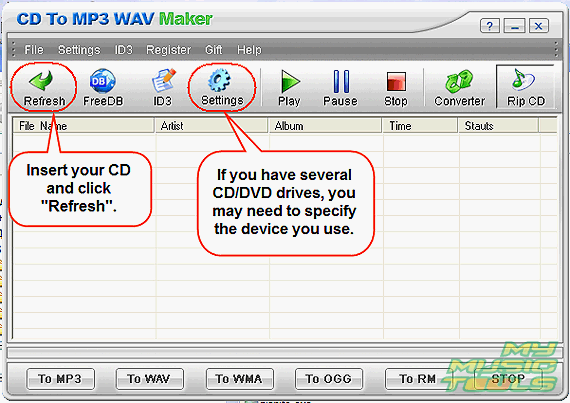
The CD to RM converter scans your Audio CD and shows all tracks. If also starts to search for the CD data on the internet. If the search is successful, titles, artists, name of the album etc. will be shown. If tracks aren't recognized, you may try another search by clicking "FreeDB" button.
Step 3: Rip tracks from your Audio CD to RM format.
Now it is time to set up RM codecs to get desired proportion between quality and file size. Click "Settings". Select "WMA/RM" from the list on the left.
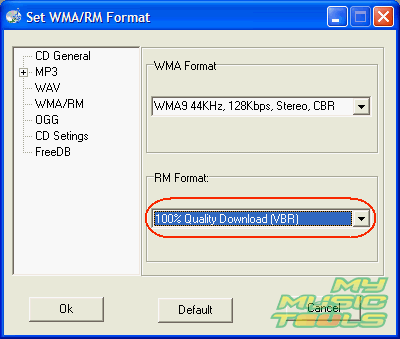
Choose quality for the output files from the dropdown menu in RM Format area.
Click "OK" to close settings.
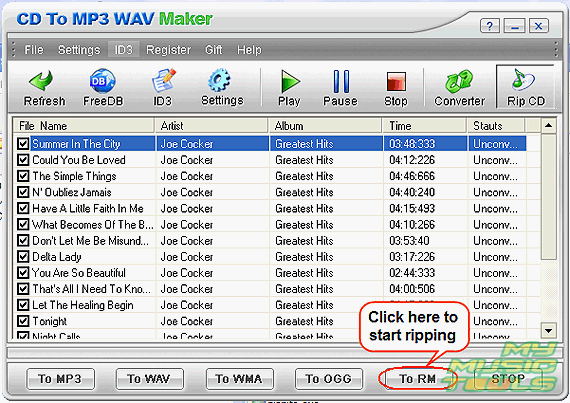
Now make sure that all needed tracks are selected (you can uncheck the ones you don't want to rip) and click "To RM". The program starts ripping CD to RM and displays the progress.
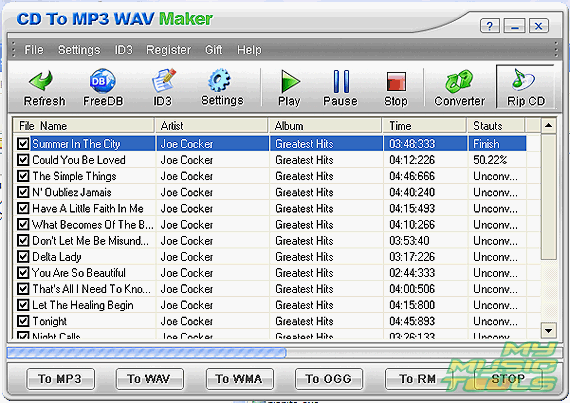
You can cancel the ripping any time by clicking "STOP" button.
Default output folder is "C:\My Music". You can change it in "CD General" section of the "Settings" menu.


Search
Related
Ask our expert
- How to share screen videos online?
- How to sort duplicate music files by ID3 tags?
- How to get quick updates on movies by director?
- How to convert multiple MIDI files into an MP3?
- How to rotate videos?
- How to convert WMA to WAV?
- How to play MIDIs on an iPhone?
- How to split an audio file into equal parts?
- How to split m4b audiobooks into chapters for free?
- How to convert videos for You Tube?
