




How to convert AAC to MP3 for free?
Introduction.
AAC stands for Advanced Audio Coding. It's a lossy audio format developed by several contributors, including Fraunhofer IIS, AT&T Bell Laboratories, Sony Corporation, Nokia. AAC is used as the default audio format on computers and devices from Apple. Taking that into account, it's quite popular format for music, audio books and other audio files.
However, MP3 is far better supported by different devices and programs, so from time to time you may need to convert AAC to MP3. That's what we will do in this article using a free AAC converter tool called Free M4a to MP3 Converter.
Step 1: Download and install the program.
Download Free M4a to MP3 Converter to a known location. Run the setup program and follow its instructions.
Step 2: Start the program. Add AAC files to convert.
Launch the installed application. The main window will appear on your screen:
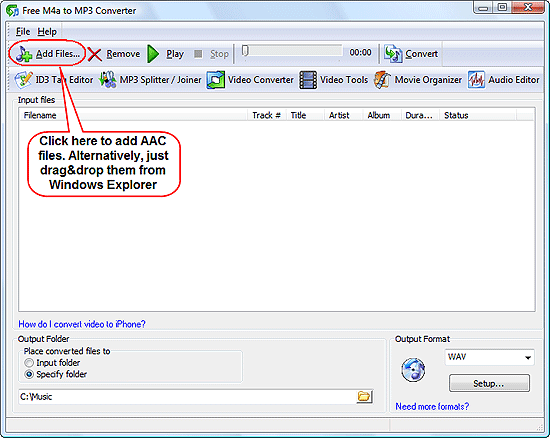
Click "Add files..." on the toolbar to get a usual "Open file" dialog:
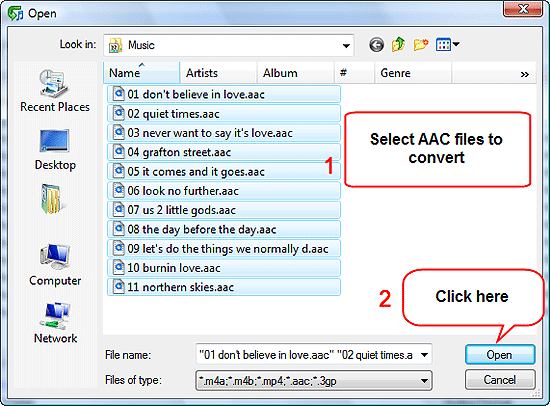
Browse to the folder where you keep your AAC files, highlight the ones that you need to convert to MP3, confirm your selection by clicking "Open".
Alternatively, you can simply drag and drop necessary files from Windows Explorer. If you cannot do that, most probably your files have a different file extension (not .aac). The program accepts files only with supported extensions, which are .aac, .m4a, .mp4, .3gp, .m4b.
Step 3: Convert AAC to MP3.
The files will be added to the conversion list.
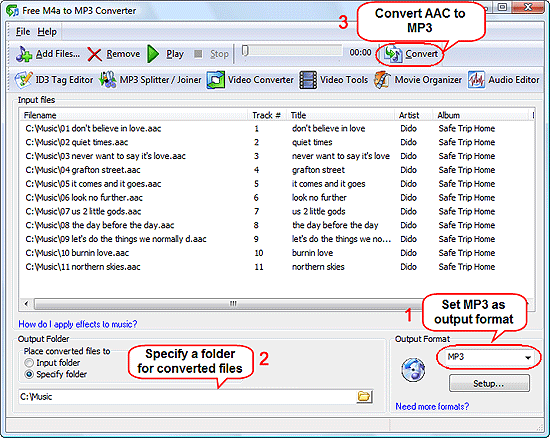
Now, 3 things should be done.
(1) Set the output format field to MP3 (right lower corner of the program). You can adjust format settings by clicking "Setup" in the same area.
(2) Select a folder on your computer to save converted files (MP3s). It can be any folder, just make sure to have necessary permissions for it. Windows Vista and Windows 7 may block or redirect some write attempts without warning the user, so if you can find no converted files, make sure that you can create files in the selected folder.
(3) Click the "Convert" button on the toolbar to start converting AAC to MP3.
As we have already mentioned, the program is completely free, there are no trial limitations.

Search
Related
- How to split m4b audiobooks into chapters for free?
- How to convert M4A to WAV for free?
- Convert M4b to MP3 and cut by chapters
- How to convert ALAC to MP3?
- How to convert M4b to MP3 for free?
- How to convert AAC to MP3 for free?
- How to convert M4a to MP3 for free?
- How to convert MP4 to MP3?
- How do I convert MP3 to M4a?
- 4Musics Multiformat Converter 1.55 review
- Audio Conversion Wizard 1.8 review
- How to convert RM to MP3?
Ask our expert
- How to share screen videos online?
- How to sort duplicate music files by ID3 tags?
- How to get quick updates on movies by director?
- How to convert multiple MIDI files into an MP3?
- How to rotate videos?
- How to convert WMA to WAV?
- How to play MIDIs on an iPhone?
- How to split an audio file into equal parts?
- How to split m4b audiobooks into chapters for free?
- How to convert videos for You Tube?
