




How do I create ring tones for my cellular?
Introduction.
A little more than ten years ago mobile phones were still rare. Now they are everywhere. They have become an important part of our lives, they connect us to the whole big world. We use them constantly, every day, to stay in contact with our friends, families, business partners etc.
Such a use implies that a cellular is no less important that any detail of our clothes. That's why we want to customize it, to make it reflect our individuality.
It's also useful, because individual ring tones help us detect: it's our cellular that is ringing.
We will explore an easy-to-use program that can create ring tones out of audio files or CD tracks - Create Ringtone. It will automatically convert MP3 to MMF, MP3 to AMR, or use any other format suitable for your mobile phone.
Step 1: Download and install the application.
Download Create Ringtone to a known location. Run setup and follow on-screen instructions to install the program.
Step 2: Launch the program. Select to open an audio file.
Launch the ringtone creator. The following window appears:
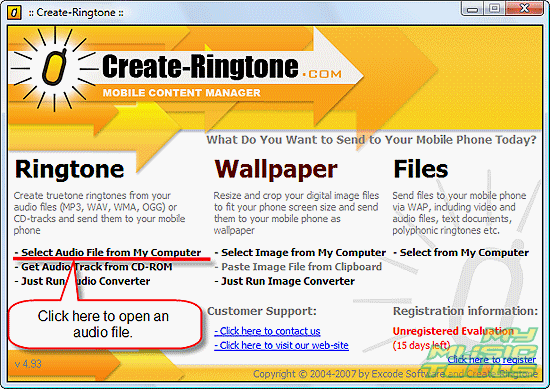
Click "Select Audio File from My Computer".
It will bring you to the usual "Open" dialog. Browse to your audio files and select one of them. Click "Open".
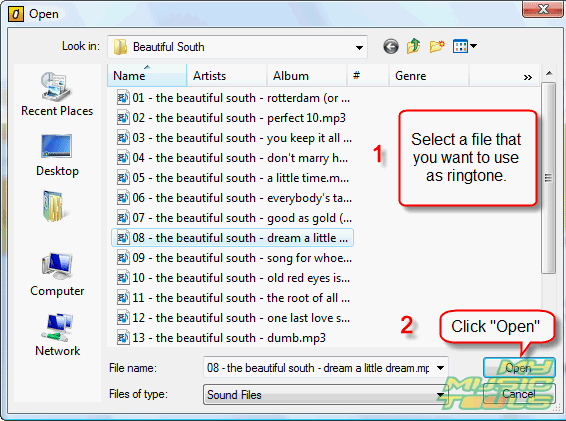
Step 3: Select a part that you want to use as ring tone.
The program will process the file and build its waveform.
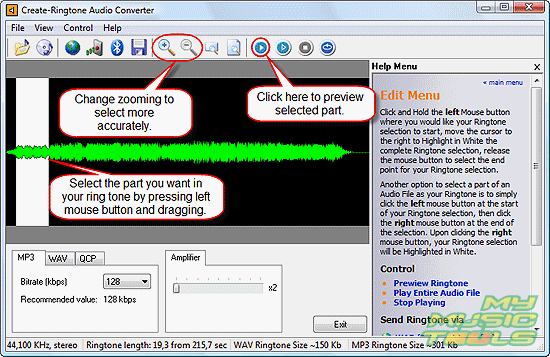
Select some part directly on the waveform. Press left button on your mouse and drag it to highlight a part of file. Use zoom to set cut points more precisely. Preview the resulting part by clicking "Play" button.
Of course, you can use the whole file as a ring tone, but mobile phones usually don't ring for five or more minutes, so there's no point in converting the whole song.
Step 4: Save the new ring tone or transfer it to your cellular.
The ringtone maker has a nice feature: it allows you to transfer new-made ring tone to your cellular quite easily. Three options are available: Infrared, Bluetooth, and transferring per Internet. If you don't want to use any of those, you can simply save the file and transfer it later with help of your favorite application.
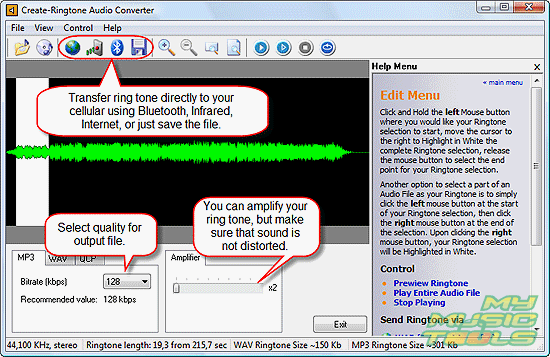
The program has built-in amplifier, but if you use it, you should check the resulting sound. It may be distorted.
Using Bluetooth and Infrared is pretty straightforward (just click the corresponding button). Let's take a look at transferring with help of the Internet.
For this option, your computer should be connected to the Internet.
Click the blue-and-green globe. The following window pops up:
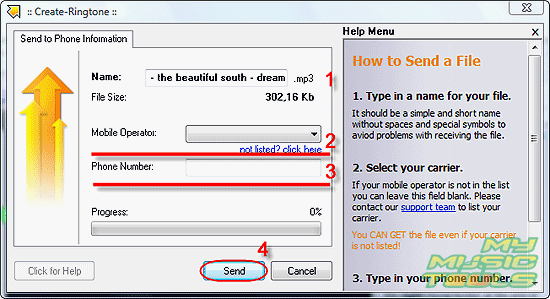
Choose name for your ring tone (1). Select your mobile operator from the drop-down list (2). If your operator is not listed or you can't recognize it, just leave the field empty. Type your mobile number (without country code) in (3). Click "Send" (4).
Your file will be uploaded to a server, and you'll get SMS with link to the file. Just follow the link (you need to have WAP service activated on your cellular) to download your ring tone. The link expires in 30 minutes after uploading.


Search
Related
-
[an error occurred while processing this directive]
Ask our expert
- How to share screen videos online?
- How to sort duplicate music files by ID3 tags?
- How to get quick updates on movies by director?
- How to convert multiple MIDI files into an MP3?
- How to rotate videos?
- How to convert WMA to WAV?
- How to play MIDIs on an iPhone?
- How to split an audio file into equal parts?
- How to split m4b audiobooks into chapters for free?
- How to convert videos for You Tube?
