




How do I cut MP3 album using CUE sheet?
Introduction.
You have an album of your favorite band in a single MP3 file and want to get separate tracks without recompressing the whole thing? Well, it's pretty easy. You just need an MP3 cutter, a special program that can split MP3 files in a number of ways, so that you can choose the easiest way to accomplish the task. We will discuss how to cut an MP3 album using CUE sheet with Visual MP3 Splitter & Joiner, as this program has all necessary functions.
Preparations.
Download Visual MP3 Splitter & Joiner to a known location. After download is complete, launch setup and follow instructions on screen.
Step 1: Open CUE file.
CUE sheet is a small text file that contains information about tracks. Usually it has the same name as MP3 file, but the extension is .cue instead of .mp3.
Start Visual MP3 Splitter & Joiner. Click "Add file" button.
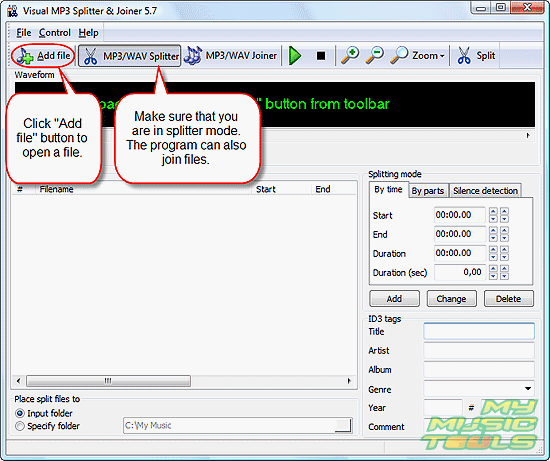
Quite usual "Open" dialog appears. Browse to the location where both MP3 and CUE files are.
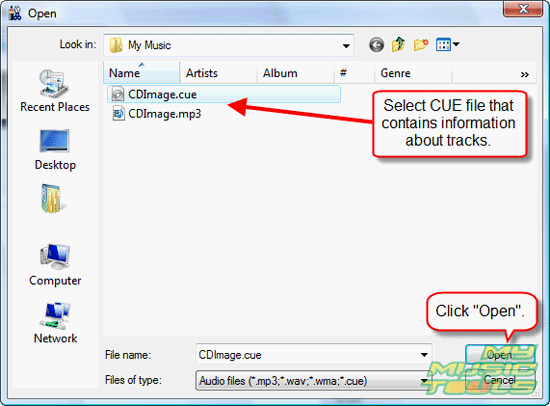
Select the corresponding CUE file and click "Open". Information about tracks will appear in the split list of the CUE splitter.
Step 2: Split.
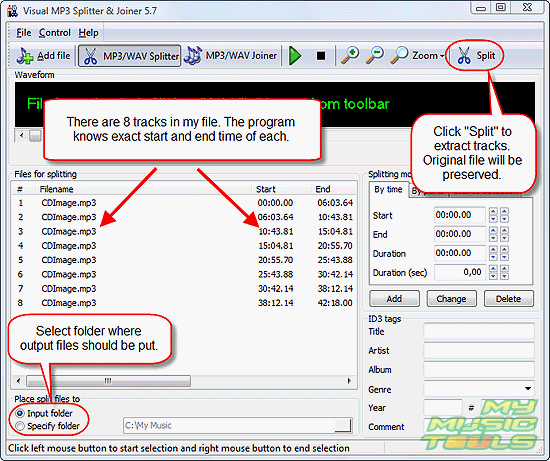
Now, select a folder on your computer where the resulting MP3 files should be saved and click "Split" button. By default output files are saved in the same folder where original file is.
Wait until the program finishes its task (a green progress bar appears in the lower right corner), then just close it and find split MP3 files in the output folder. The program doesn't actually cut MP3 file into pieces, it simply copies its segments to create new files. So don't worry if you want to keep the original file.
Trial version of Visual MP3 Splitter & Joiner allows you to split a file into 5 parts only. However, there's a way to fool this restriction. For a ten tracks album, you can simply split your big MP3 file into two parts at the beginning (for example, visually), then open each part separately and detect tracks with help of silence detection.


Search
Related
- How to split an audio file into equal parts?
- How to join WAV files?
- Easy MP3 Joiner 5.0 - Merge Your Audio Easily
- How to split APE files?
- How to create MP3 ringtones?
- How to merge MP3 files and keep the original quality?
- How to split WAV by CUE?
- MP3 splitter with batch mode support
- How to join MP3 files?
- How do I create a CUE sheet?
- How do I split MP3 file using silence detection?
- How do I cut MP3 album using CUE sheet?
- Easy MP3 Cutter 2.4 review
- Visual MP3 Splitter & Joiner 5.1 review
Ask our expert
- How to share screen videos online?
- How to sort duplicate music files by ID3 tags?
- How to get quick updates on movies by director?
- How to convert multiple MIDI files into an MP3?
- How to rotate videos?
- How to convert WMA to WAV?
- How to play MIDIs on an iPhone?
- How to split an audio file into equal parts?
- How to split m4b audiobooks into chapters for free?
- How to convert videos for You Tube?
