




How do I extract images and video from flash files?
Introduction.
Flash animation is very popular all over the Internet. The reason is quite simple and obvious: flexibility. You can embed anything into a flash file, and it will be played on any computer that supports this format. Whole websites are built with flash. Flash-player plug-ins exist for all common browsers and operating systems.
A typical flash file usually contains several elements. Among them are pictures, sounds, videos. If you want to extract images and video from flash or otherwise edit SWF, you may find Flash Decompiler Trillix quite useful.
Step 1: Download and install the program.
Download Flash Decompiler to a known location. Run setup and follow on-screen instructions to install the application.
Step 2: Start the program and open your flash file.
Launch the SWF decompiler. The following window will appear:
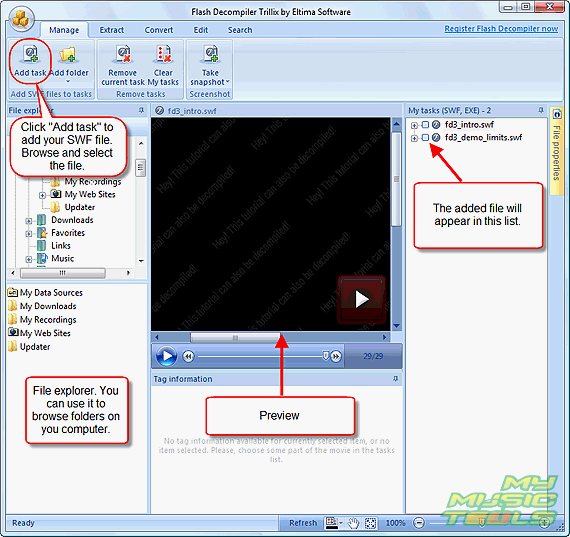
Click "Add task" button on the toolbar. Browse to the location where your flash file is saved and select it. Click "Open".
The file will appear in the "My tasks" list on the right.
I won't open any new files for now. The demo files that come with the program are sufficient to illustrate the example. So, let's move on.
Step 3: Extract images/video from the flash file.
Click "+" on the left of your flash file in the "My tasks" list. It will expand the file, showing you its content.
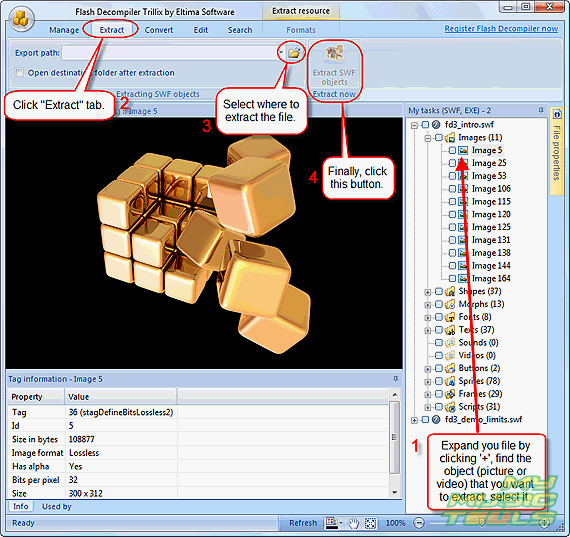
Select the object you want to extract (it will be automatically shown in the preview field), then click "Extract" tab in the upper part of the window (see screen shot above). Type a path for output files in (see "Export path" field), or simply browse to the folder using "Browse" dialog. Finally, click "Extract SWF objects" button.
You can select multiple objects to extract. The trial version allows you to pick out only two objects from each category at once.


Search
Ask our expert
- How to share screen videos online?
- How to sort duplicate music files by ID3 tags?
- How to get quick updates on movies by director?
- How to convert multiple MIDI files into an MP3?
- How to rotate videos?
- How to convert WMA to WAV?
- How to play MIDIs on an iPhone?
- How to split an audio file into equal parts?
- How to split m4b audiobooks into chapters for free?
- How to convert videos for You Tube?
