




How to convert DVD to ASF?
Introduction.
ASF stands for Advanced Systems Format (formerly Advanced Streaming Format). It's a container format developed by Microsoft for audio and video, it is especially suitable for streaming purposes. ASF files can be made copy-protected to avoid misusing them.
If you want to convert DVD to ASF, you can use a tool like YASA DVD Ripper Platinum.
Step 1: Download and install the program.
Download YASA DVD Ripper Platinum to a known location. Run setup and follow on-screen instructions to install the application.
Step 2: Start the program. Insert your DVD. Select output profile.
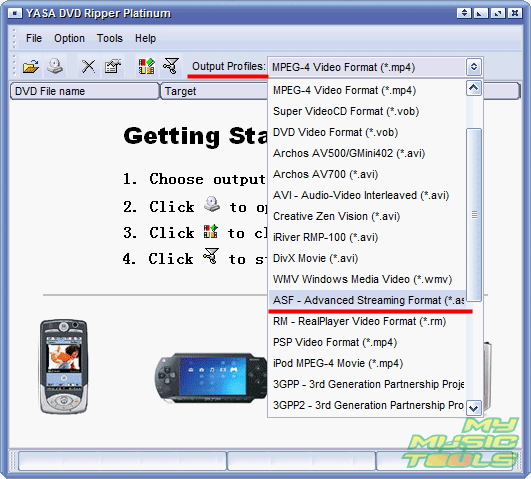
Launch YASA DVD Ripper Platinum. From the "Output profiles" dropdown list, select "ASF - Advanced Streaming Format":
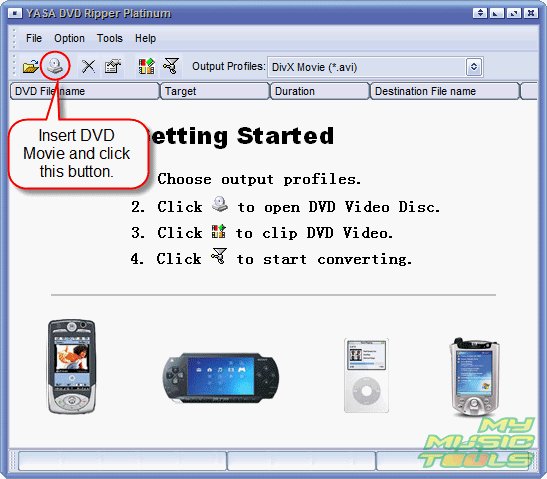
Insert the DVD that you want to rip to ASF format, wait while it's being recognized (usually it takes a couple of seconds, but if your DVD is scratched, it can take longer). Then click the "Open DVD disc" button on the toolbar.
Step 3: Set input and output options. Convert your DVD to ASF.
The ASF converter reads your DVD and pops up a simple wizard:
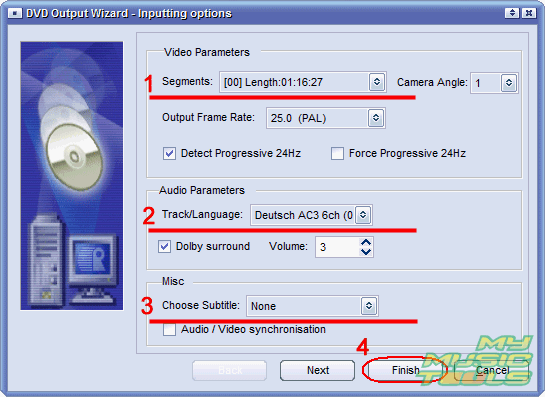
Select the title that you want to convert (1). As a DVD can contain several titles, you can select them from the dropdown list. The program usually selects the longest title (main movie).
If your DVD has several languages, choose the one you want to include into your ASF file (2).
You can also add subtitles (3).
Click "Finish" to proceed (4).
The next step of the wizard offers you output options:
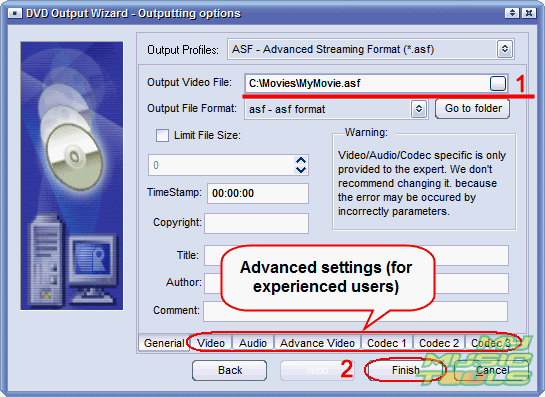
The format has been already set, but we also can choose output folder and filename (1).
If you need to adjust some audio or video settings, you can do that by clicking the right tab in the lower part of the window.
Click "Finish" to close the wizard.
The title will be added to the converting list:
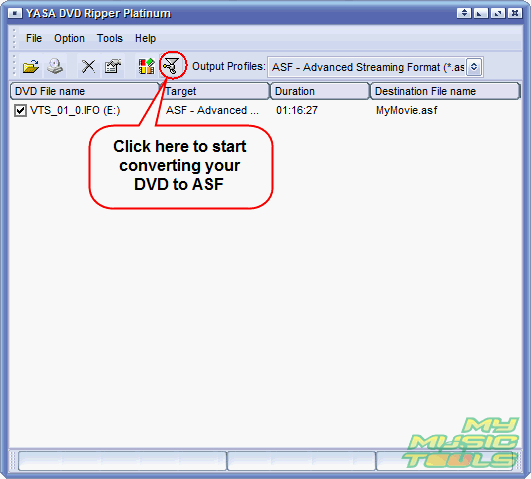
Click the highlighted "Convert" button (see the screen shot above) on the toolbar. This will command the program to start ripping the DVD to ASF. After the process is complete, you will find the converted video in the folder specified by you in the output options.
The trial version of YASA DVD Ripper Platinum will convert only 1/3 of your DVD. If you are satisfied with the quality and features, you can register your copy and unlock it with the provided data.

Search
Ask our expert
- How to share screen videos online?
- How to sort duplicate music files by ID3 tags?
- How to get quick updates on movies by director?
- How to convert multiple MIDI files into an MP3?
- How to rotate videos?
- How to convert WMA to WAV?
- How to play MIDIs on an iPhone?
- How to split an audio file into equal parts?
- How to split m4b audiobooks into chapters for free?
- How to convert videos for You Tube?
