




MP3 Tag Editor + Audio Converter + MP3 Splitter/Joiner + Duplicate Remover + MIDI Converter = 70% OFF
EN DE ES IT FR RU
How to play several audio files?
1. Start Audio Record Wizard.
2. Press the button "Add" to add audio files to the list.

3. In the window "New/Open File" select the required audio file and press the button "Save".
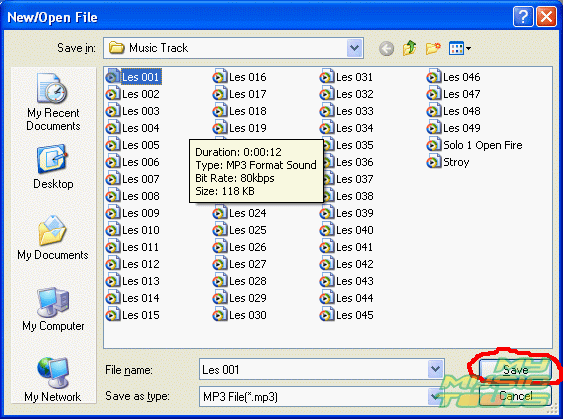
4. Repeat steps 2 and 3 several times to add the required number of audio files. In this way you will create a play list.
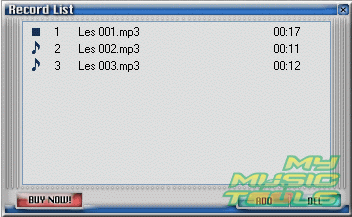
5. To start the playback press the button "Play". The program will play the files in the list one by one. Use the buttons in the Toolbar to control the playback: stop playing, add new file to the list, make a recording.

6. Have a good time!!!


Search
Related
- How to record a song?
- How do I record from microphone?
- How to record my voice to MP3?
- Voice recorder with silence detection
- How to record Skype calls?
- How do I record sound on my computer?
- How do I remove copy protection from music purchased online?
- Remove DRM Copy Protection
- How do I convert my LPs to MP3?
- Audio Record Wizard 3.99 review
- Tunebite Review
- How to play several audio files?
- Re-Recording Protected Music Files Now Even Easier
Ask our expert
- How to share screen videos online?
- How to sort duplicate music files by ID3 tags?
- How to get quick updates on movies by director?
- How to convert multiple MIDI files into an MP3?
- How to rotate videos?
- How to convert WMA to WAV?
- How to play MIDIs on an iPhone?
- How to split an audio file into equal parts?
- How to split m4b audiobooks into chapters for free?
- How to convert videos for You Tube?
