




How to split AC3 to WAV files?
Introduction.
AC3 (also AC-3) is a lossy audio compression technology that is often used for movies. An AC3 stream can contain up to six channels of sound (a usual stereo contains only two), which is perfect for a system with surround speakers. Every channel is meant to be output to a certain speaker: front left, front right, center, back left, back right, subwoofer. The channels contain more or less different audio streams, which creates the impression of moving things, echo etc. AC3 is also known as Dolby Digital.
If you need to perform some basic (or advanced) audio editing, to add or remove some effects, you can decompose an AC3 audio track to separate files with AC3 Tools Pro.
Step 1: Download and install the program.
Download AC3 Tools Pro to a known location. Run setup and follow on-screen instructions to install it.
Step 2: Start the program. Select AC3 file to split.
Launch AC3 Tools Pro. You will see the following window:
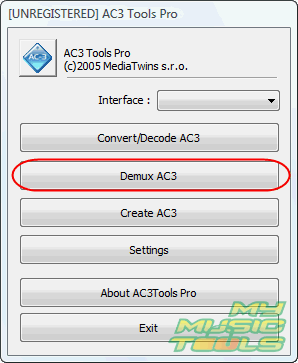
Select to demux AC3. The program also allows converting AC3 to MP3 (AC3 converter) and creating AC3 from different WAV channel-files, but for now we will consider only the AC3 decoder part.
The window is replaced by another one:
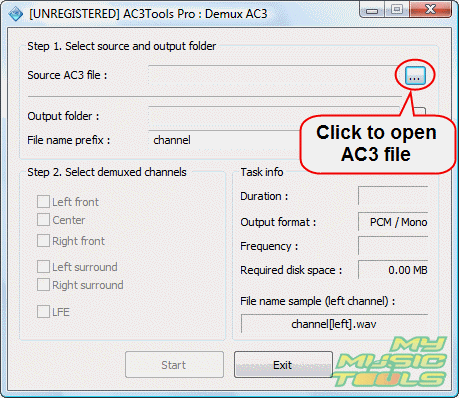
On the right to the source AC3 file field, click "...". This will invoke a usual "Open" dialog:
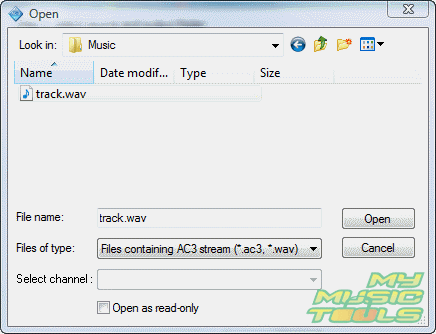
Browse to the folder where your AC3 file is stored, select the file, click "Open".
Step 3: Select AC3 channels to extract.
AC3 Tools Pro recognizes which channels are present in the file and offers to select them (the rest is grayed out). However, first you should set an output folder:
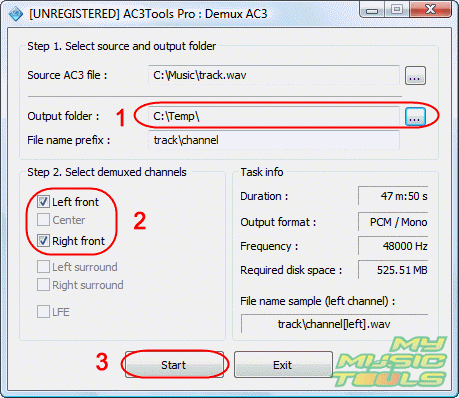
This can be done by clicking "..." in the corresponding area (1).
Select the channels that you want to extract (2). Each channel will be extracted into a separate WAV file.
Optionally you can set a pattern for creating filenames.
Finally, click "Start" (3) to extract AC3 channels.


Search
Related
-
[an error occurred while processing this directive]
Ask our expert
- How to share screen videos online?
- How to sort duplicate music files by ID3 tags?
- How to get quick updates on movies by director?
- How to convert multiple MIDI files into an MP3?
- How to rotate videos?
- How to convert WMA to WAV?
- How to play MIDIs on an iPhone?
- How to split an audio file into equal parts?
- How to split m4b audiobooks into chapters for free?
- How to convert videos for You Tube?
