




How to extract voice from a song?
Introduction.
In this article we will discuss extracting voice from a song. This can be useful for getting an acapella version of the song, i.e. a vocals-only sound track. The thing is about separating specific sound frequencies in the stream. Voice has its own frequency range and a waveform that is different from the waveform of music. Our goal for now is to find out how music editing software like AV Music Morpher Gold separates and extracts vocals from an audio track.
Step 1: Download and install the program.
Download AV Music Morpher Gold to a known location. Run the downloaded setup and follow its instructions to install the program.
Step 2: Start the program. Select an audio file to extract vocals.
Launch the voice extractor. The main window will be shown:
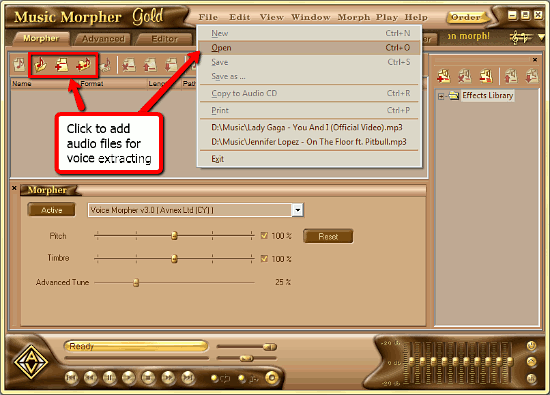
We are on the "Morpher" tab (see the top of the window, above its toolbar). Let's continue working here, this tab will help us with voice extracting.
Now we are to select the audio file that we want to extract voice from. To do so, click "File" - "Open" or one of the buttons shown on the screenshot above. A usual "Browse" dialog will appear:
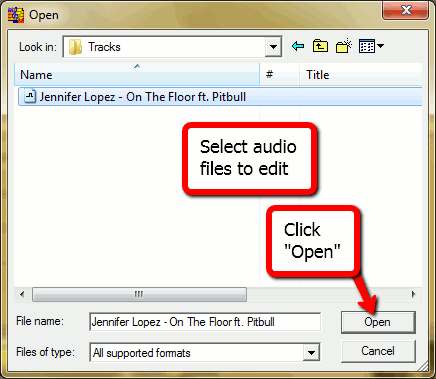
Find the folder with your audio file for voice extraction, select it and click "Open" to proceed.
The selected song will be shown in the editing list.
Step 3: Set voice extractor options.
In the lower part of the audio editor's window, the "Morpher" section is located. Here you can select audio processing functions. Click on "Voice extractor" in the list.
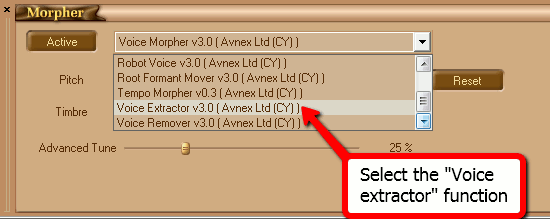
The "Morpher" area will change. Advanced vocals extracting options will be shown:
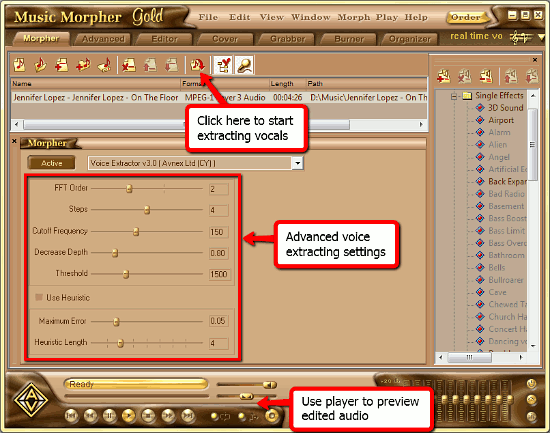
The meaning of these options:
- FFT order is used to set precision of the deconvolution algorithm.
- Steps slider is used to set the number of frames to be analyzed every 50 ms. It has effect on smoothness of the produced result.
- Cutoff Frequency defines the low frequency margin of the high-pass filter.
- Decrease Depth is used to define the suppressing strength level of musical instruments' volume.
- Threshold is minimum allowable relative amplitude of frequency components to pass to the output. This parameter allows to remove quiet sounds that were not deleted by the main algorithm.
- Use Heuristic is used to switch the heuristic module on/off.
- Maximum error is the parameter which affects the number of harmonics to be removed after analysis.
- Heuristic Length is the number of frames for error calculating. A big number of frames provides efficient deletion of drums.
There are lots of settings allowing you to adjust and customize the "vocals filter", but they might look complicated at first sight. So you can simply skip them, as the default options are acceptable in most cases. Go on to previewing the edited audio with the help of the player below.
Step 4: Extract vocals from a song.
Now highlight your song in the editing list and click the "Morph selected files" button on the toolbar. A small window will pop up:
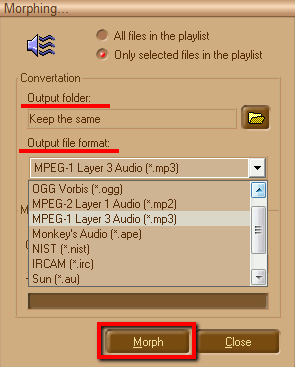
Select a folder for extracted vocals. By default, the folder containing the original file is suggested.
From the drop-down list below, select an audio format for output files. Finally, click "Morph" to extract voice from the song.
It will take several seconds for the audio editor to process the audio file.
The trial version of AV Music Morpher Gold will work for 30 days. If you like the program, you can register it and use without any limitations.


Search
Related
Ask our expert
- How to share screen videos online?
- How to sort duplicate music files by ID3 tags?
- How to get quick updates on movies by director?
- How to convert multiple MIDI files into an MP3?
- How to rotate videos?
- How to convert WMA to WAV?
- How to play MIDIs on an iPhone?
- How to split an audio file into equal parts?
- How to split m4b audiobooks into chapters for free?
- How to convert videos for You Tube?
