




How do I remove duplicates on my computer?
Introduction.
A long time ago I was able to list every file on my computer with my eyes closed. Nowadays it's simply impossible. On some systems, millions of files are not uncommon.
We copy information from one place to another, download something from the internet, and then one day we ask ourselves: why is there so little space on my hard disk? Where are all those megabytes and gigabytes?
The most popular way to free some space on the hard disk is to remove duplicates. If you didn't do it before, you will probably be amazed to see how much space can be recovered by removing useless copies.
We will discuss a clone remover program that is designed solely to deal with the problem, Advanced Duplicates Finder. It can search for duplicates, including audio, video, pictures etc.
Step 1: Download and install the program.
Download Advanced Duplicates Finder to a known location. Run setup and follow on-screen instructions to install the application.
Step 2: Start searching for duplicates.
Launch the program.
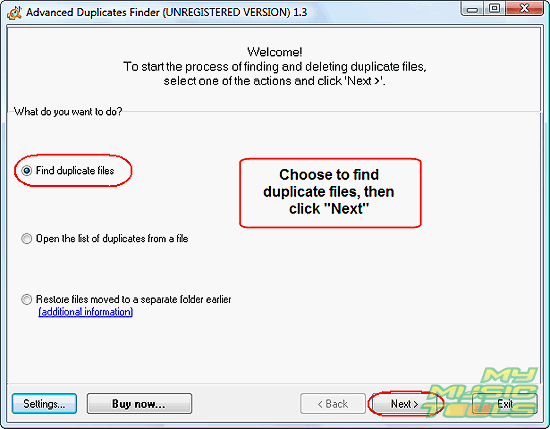
Choose to find duplicate files and click "Next".
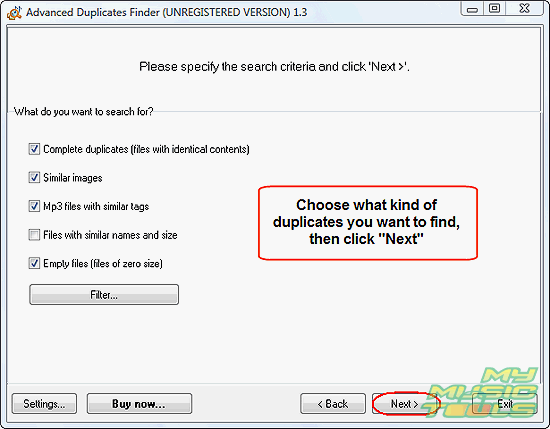
Select the appropriate search criteria. The duplicate finder has a number of search algorithms, you can any of them separately, or just all of them at once. You can also use a filter to select of avoid selecting certain types of files.
Click "Next".
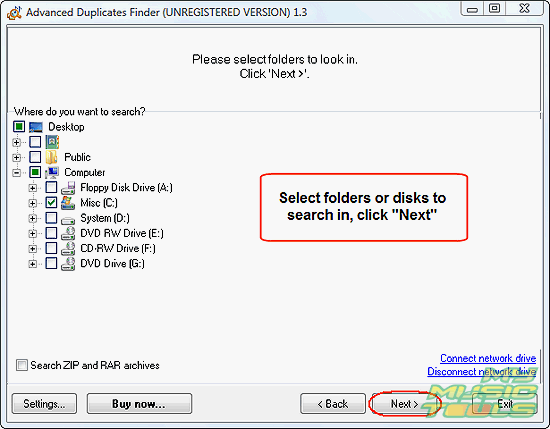
Check folders or disks that you want to search for duplicates. Click "Next" to continue.
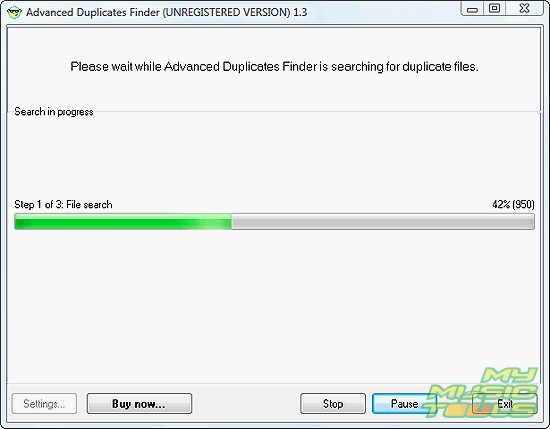
Now the program starts searching. It can take some time, depending on your system and on the number of files in the selected folders. Also some searching algorithms are more time consuming than other. You can just minimize the program and let it run in the background.
Step 3: Select duplicates to remove.
Finally the program comes up with a list of duplicates.
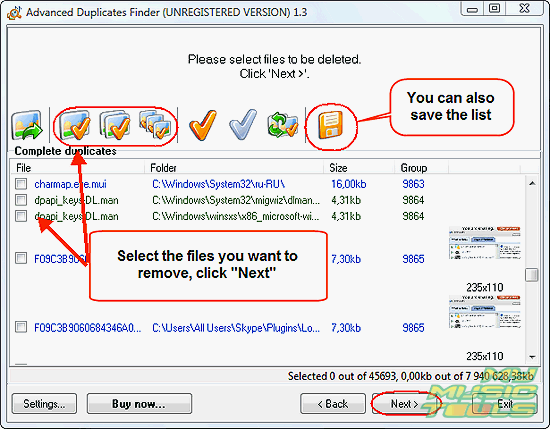
It is possible to review all the files and check duplicates manually, but Advanced Duplicates Finder is also able to remove duplicates automatically. You can click the corresponding button to do this. However, remember that some search algorithms deliver files that are not quite duplicates. For example, two different versions of one song (live and album) may have the same ID3 information, which will result in listing it as a duplicate.
At last, choose what to do with your duplicates.
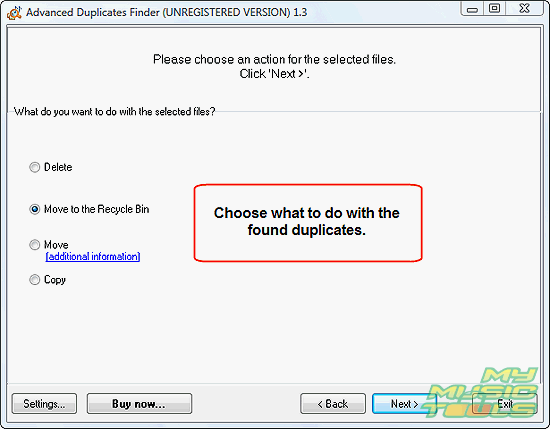
By default, the program offers you to move the files to the Recycle Bin. This way, you can easily restore them, if something useful is deleted. Let a few days pass before emptying your Recycle Bin. Until then the space will not be recovered, but there's a better chance that you will find out if something is missing.

Search
Related
- How to sort duplicate music files by ID3 tags?
- How to add cover art to an mp3 file?
- How to rename a batch of audio files?
- How to find all songs on your PC
- How to import ID3 tags from CSV?
- How to find MP3 duplicates by sound?
- How to fix ID3 tags?
- How to export ID3 tags to MS Excel?
- How to edit FLAC tags?
- How to download FLAC lyrics for free?
- How to add track numbers to ID3 tags?
- Duplicate File Finder for Music
- How to extract MP3 tags from filenames?
- How to download MP3 lyrics for free?
- How to remove music duplicates?
- How do I find duplicates in my music collection?
- How to rename MP3 files using ID3 tags?
- What ID3 tag editor can edit WMA tags?
- How to edit AAC tags?
- How to download MP3 album art?
- How do I get ID3 tags from the Internet?
- How to download lyrics for songs?
- How do I tag MP3 files with ID3 data using filenames?
- How do I sort MP3 files? I want to organize my music collection.
- How to keep track of my borrowed music albums?
- How to make a catalog of my music collection using album barcodes?
- How to get the biography of an artist?
- How to manage my music collection on a Dune HD media player?
- How to organize my music collection?
- How do I organize my music collection?
- How do I remove duplicates on my computer?
- How to create a playlist?
- Media Catalog Studio 4.5 review
Ask our expert
- How to share screen videos online?
- How to sort duplicate music files by ID3 tags?
- How to get quick updates on movies by director?
- How to convert multiple MIDI files into an MP3?
- How to rotate videos?
- How to convert WMA to WAV?
- How to play MIDIs on an iPhone?
- How to split an audio file into equal parts?
- How to split m4b audiobooks into chapters for free?
- How to convert videos for You Tube?
