




How to make a catalog of my music collection using album barcodes?
Introduction.
Organizing your album library with some specialized software makes it easier and more enjoyable. But what is the best way to organize your music? Modern software is capable of taking data even without any manual input. But how can you inform your computer what music album you want to put into the local database without typing the name of the album manually?
Musicnizer is a music manager that can scan barcodes from DVD boxes and download album details from the internet. It supports USB barcode scanners, but there is also an interesting extra feature: the program can read barcodes using an ordinary webcam.
Step 1: Download and install the program.
Download Musicnizer to a known location. Run the downloaded setup program and follow its instructions.
Step 2: Start the program. Add an album.
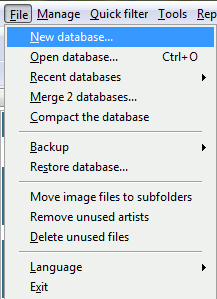
Launch Musicnizer. You will see a demo album database and Musicnizer will prompt you to create a new one. So click "File" - "New database", choose some name and destination folder for your music collection database, then hit "Save".
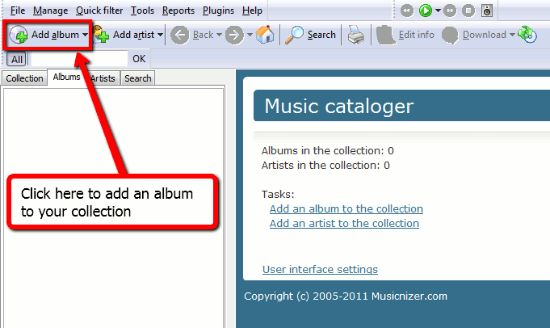
Now you can add some albums to your own local music database. Click "Add album" on the toolbar.
A new window will appear with options to choose from:
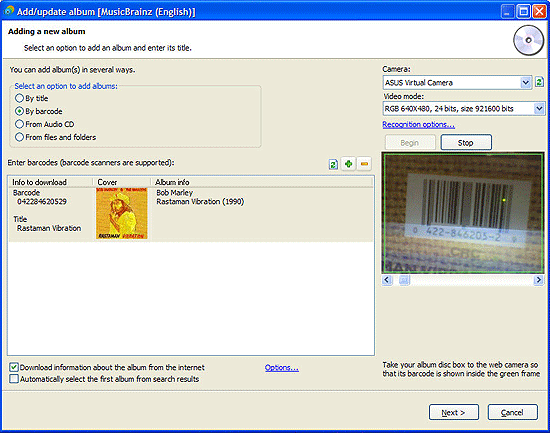
Select the "By barcode" option. The content of the window will change. If you web camera is connected, it will be recognized and enabled automatically. Put the DVD box of the album that you want to add to the webcam so that its barcode fits the green frame (like on the screenshot above). The code will be recognized, the title and cover of the album will appear in the list on the left.
If you have some problems with barcode recognition, click the "Recognition options" link and try to adjust camera settings. If you don't have any camera or barcode scanner, you can still enter the barcode manually. Just click the barcode field and type in the digits.
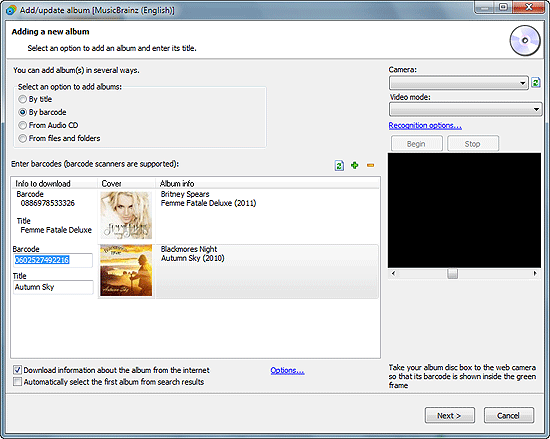
In this way you can add any number of music CDs to the list. Finally click "Next" to proceed.
Musicnizer will start downloading information about your music albums from the internet. You can enable the "Automatically select the first album from search results" option to skip search results. If this option is not checked, the window with available search results will appear allowing you to choose the right one. Double click the correct result or select it and click "Next".
Finally all your albums will be supplied with such details as genres, covers, reviews and put into your personal album library, allowing you to search and sort your music collection easily, generate reports and statistics etc.
The free trial version of Musicnizer allows to add up to 20 music albums to one database. If you like its features, you can register the program and remove all limitations.

Search
Related
- How to sort duplicate music files by ID3 tags?
- How to add cover art to an mp3 file?
- How to rename a batch of audio files?
- How to find all songs on your PC
- How to import ID3 tags from CSV?
- How to find MP3 duplicates by sound?
- How to fix ID3 tags?
- How to export ID3 tags to MS Excel?
- How to edit FLAC tags?
- How to download FLAC lyrics for free?
- How to add track numbers to ID3 tags?
- Duplicate File Finder for Music
- How to extract MP3 tags from filenames?
- How to download MP3 lyrics for free?
- How to remove music duplicates?
- How do I find duplicates in my music collection?
- How to rename MP3 files using ID3 tags?
- What ID3 tag editor can edit WMA tags?
- How to edit AAC tags?
- How to download MP3 album art?
- How do I get ID3 tags from the Internet?
- How to download lyrics for songs?
- How do I tag MP3 files with ID3 data using filenames?
- How do I sort MP3 files? I want to organize my music collection.
- How to keep track of my borrowed music albums?
- How to make a catalog of my music collection using album barcodes?
- How to get the biography of an artist?
- How to manage my music collection on a Dune HD media player?
- How to organize my music collection?
- How do I organize my music collection?
- How do I remove duplicates on my computer?
- How to create a playlist?
- Media Catalog Studio 4.5 review
Ask our expert
- How to share screen videos online?
- How to sort duplicate music files by ID3 tags?
- How to get quick updates on movies by director?
- How to convert multiple MIDI files into an MP3?
- How to rotate videos?
- How to convert WMA to WAV?
- How to play MIDIs on an iPhone?
- How to split an audio file into equal parts?
- How to split m4b audiobooks into chapters for free?
- How to convert videos for You Tube?
