




How to manage my music collection on a Dune HD media player?
Introduction.
Dune HD media player is a device that enables you to experience superior audio and video quality while watching movies or listening to music. Capable of playing almost every video/audio format over the network or from media storage devices, Dune is a universal media center for family entertainment.
One of its interesting features is the ability to show your media collection not as a list of files and folders, but as an informative catalog. It means that items of your music or video collection can be displayed as movie or album covers. Also such catalog allows searching and sorting movies and music by categories and displaying additional information.
Musicnizer is the only tool so far capable of creating a Dune catalog for your audio collection.
Step 1: Download and install the program.
Download Musicnizer to a known location. Run the downloaded setup program and follow its instructions.
Step 2: Start the program. Create your music database.
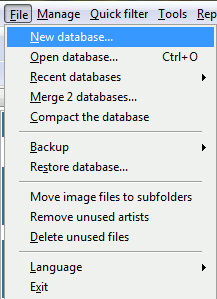
After the program starts, you will see a demo album database and Musicnizer will prompt you to create a new one. So click "File" - "New database", choose a name and a destination folder for your music collection database, then hit "Save".
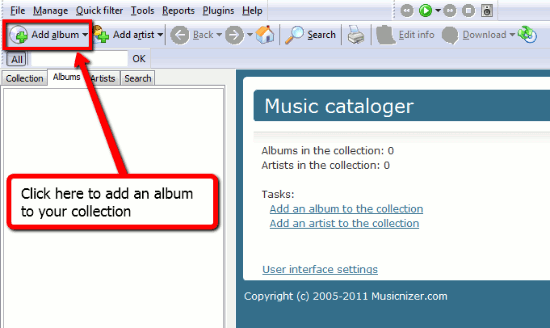
Now you we can add some albums to your local music database. To do so, click "Add album" on the toolbar.
A new window will pop up. Pick the "From files and folders" option.
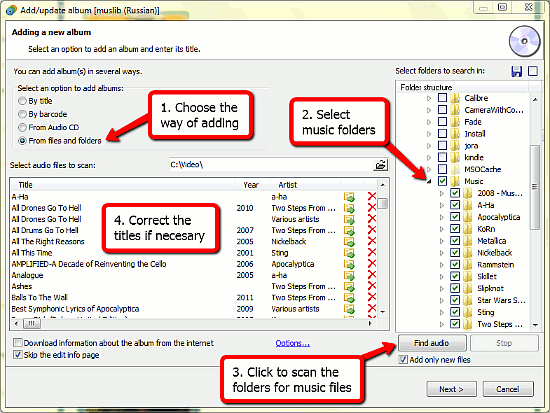
In the folder structure tree on the right, check folders containing music files that you want to add to your album collection in Musicnizer. Hit the "Find audio" button to scan the selected folders for audio files. Musicnizer will find your albums and populate the list on the left. The program extracts information from ID3 tags or filenames. Check the list and edit wrong album names (all titles can be edited). If you want to remove an album from the list, click the red cross button next to it.
Finally, click "Next" to populate your own music library database.
Step 3: Create Dune music catalog.
Now we have all necessary information, including album covers, genres, list of artists, links to audio files. So let's use this information to create a music catalog for our Dune player.
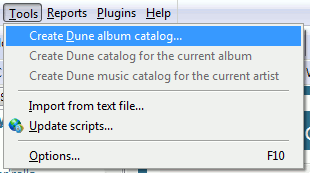
Click "Tools" - "Create Dune album catalog":
A wizard will show up:
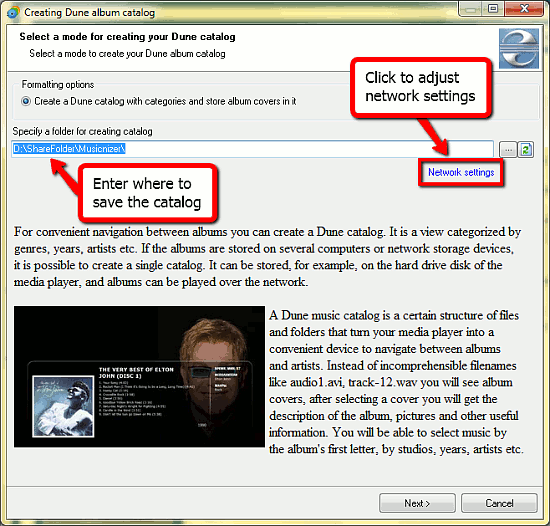
In the first step, enter some path. This is where Dune catalog files will be saved. Adjust network settings by clicking on the "Network settings" link (if necessary) and hit "Next" to proceed.
Here we can select categories for our Dune album catalog. Categories allow us to sort albums in different ways on our Dune.
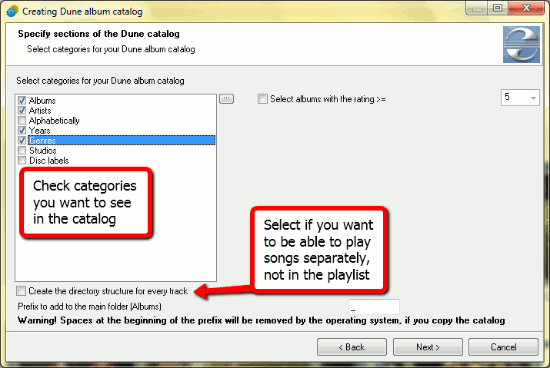
Dune plays media files from playlists of every directory, so if you want to be able to play separate songs on your Dune, check "Create the directory structure for every track". After all options set, click "Next".
The next step is very important: here you choose the correct connection type between the storage device where you keep your media files and Dune.
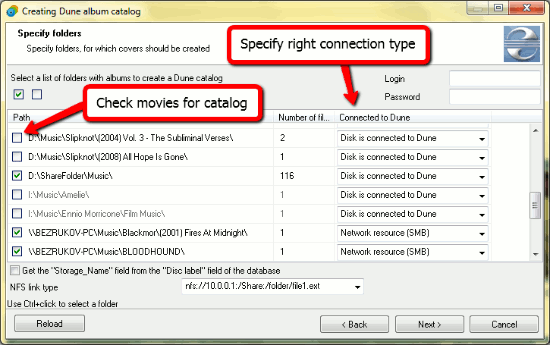
From the dropdown list on the right, select a connection type. "Network resource" means that Dune should access music files over a network. If files are directly available to your Dune (located on an internal HDD, on an external HDD or USB flash drive connected to Dune), select the "Disk is connected to Dune" option. Specify login and password for network folders, if your folders are password-protected (but do not enter anything if they are simple shares!). Click "Next".
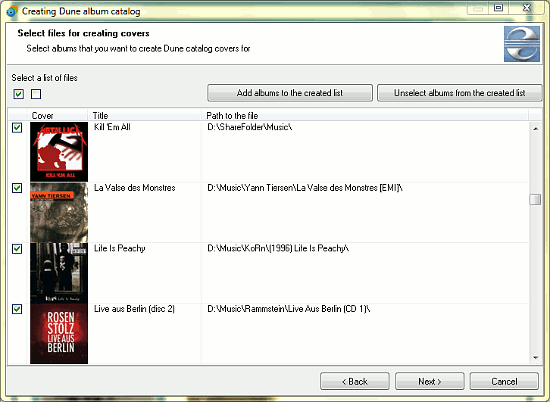
In this step, select albums you want to add to your Dune catalog and click "Next".
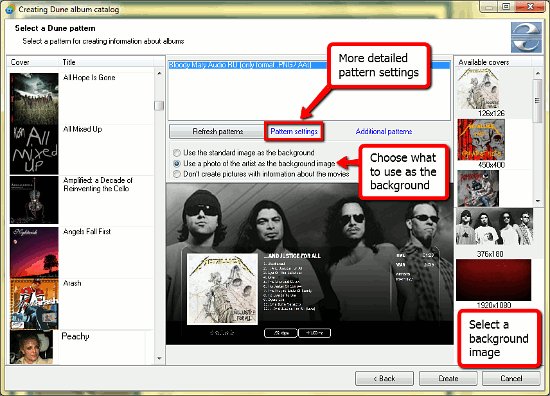
The last step shows you a preview of the catalog and allows to choose background images for album information. For advanced options, click the "Pattern settings" link. Finally, click "Create" to build a music catalog for your Dune.
Now simply open the newly created album catalog with the file browser of your Dune and enjoy the full-featured advanced navigation containing covers, band photos, album reviews, and other details.

Search
Related
- How to sort duplicate music files by ID3 tags?
- How to add cover art to an mp3 file?
- How to rename a batch of audio files?
- How to find all songs on your PC
- How to import ID3 tags from CSV?
- How to find MP3 duplicates by sound?
- How to fix ID3 tags?
- How to export ID3 tags to MS Excel?
- How to edit FLAC tags?
- How to download FLAC lyrics for free?
- How to add track numbers to ID3 tags?
- Duplicate File Finder for Music
- How to extract MP3 tags from filenames?
- How to download MP3 lyrics for free?
- How to remove music duplicates?
- How do I find duplicates in my music collection?
- How to rename MP3 files using ID3 tags?
- What ID3 tag editor can edit WMA tags?
- How to edit AAC tags?
- How to download MP3 album art?
- How do I get ID3 tags from the Internet?
- How to download lyrics for songs?
- How do I tag MP3 files with ID3 data using filenames?
- How do I sort MP3 files? I want to organize my music collection.
- How to keep track of my borrowed music albums?
- How to make a catalog of my music collection using album barcodes?
- How to get the biography of an artist?
- How to manage my music collection on a Dune HD media player?
- How to organize my music collection?
- How do I organize my music collection?
- How do I remove duplicates on my computer?
- How to create a playlist?
- Media Catalog Studio 4.5 review
Ask our expert
- How to share screen videos online?
- How to sort duplicate music files by ID3 tags?
- How to get quick updates on movies by director?
- How to convert multiple MIDI files into an MP3?
- How to rotate videos?
- How to convert WMA to WAV?
- How to play MIDIs on an iPhone?
- How to split an audio file into equal parts?
- How to split m4b audiobooks into chapters for free?
- How to convert videos for You Tube?
