




How do I convert VOB to MP4?
Introduction.
VOB is a container format for audio, video, subtitles, and menus. The most usual sources of VOB files are DVD Video discs. VOB files can exist as usual files, and some software video players are able to play them in such form, although not perfectly. If you simply burn a VOB file to DVD, your hardware DVD player won't play it. A proper DVD Video should contain additional structure.
VOB files are usually very big. To decrease their size and also to make them playable with most players, you can consider converting them into MP4 format.
We will discuss how to convert VOB to MP4 using YASA VOB to MP4 Converter.
Step 1: Download and install the program.
Download YASA VOB to MP4 Converter to a known location. Run setup and follow on-screen instructions to install the application.
Step 2: Start the program. Open your VOB file.
Launch VOB to MP4 Converter. The main window appears:
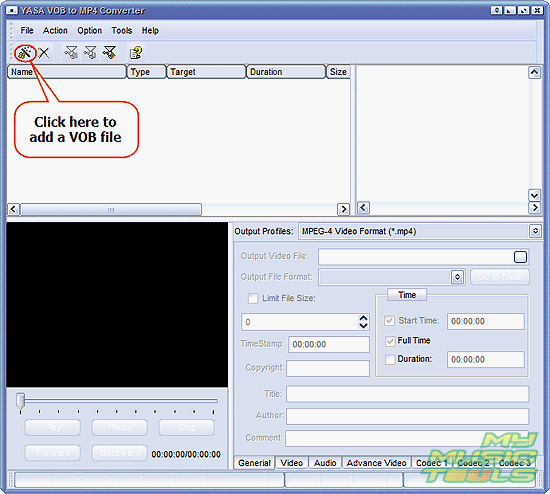
Click the highlighted button to get a usual "Open" dialog, or click "File" - "Add Video file".
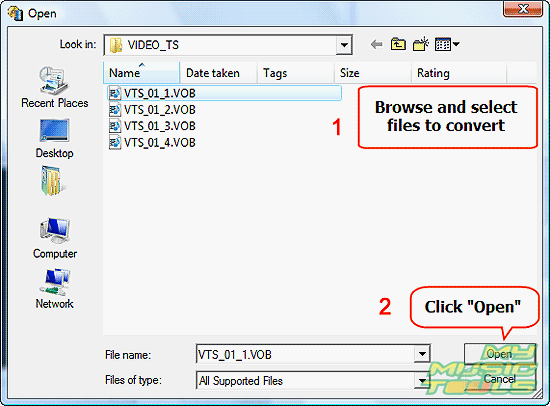
Browse to the directory where your VOB files are stored and select one (or a group) of them. Click "Open".
Step 3: Set output format and folder. Convert your VOB to MP4.
The file(s) will be added to the list of the VOB converter. You can preview any file from the list using the controls in the left lower corner. Some technical information about added source files is shown on the right.
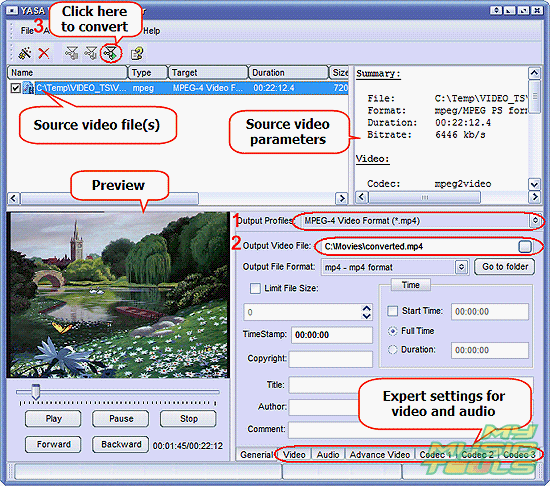
From the "Output Profiles" dropdown list, select MPEG-4 Video Format (*.mp4) (1). Then choose a folder for saving converted files (2). If you have problem saving files in some particular folder, check your permissions and ownership.
The program allows you to fine tune different video and audio parameters, but if you are not sure about them, just use the defaults.
Finally, click the "Quick Convert!" button on the toolbar (3) to convert VOB stream to a proper MP4 video file.
The trial version of YASA VOB to MP4 Converter converts only 5 minutes of video. If you are satisfied with the quality and functionality, you can register online and remove all restrictions with your code.


Search
Related
- How to convert videos for You Tube?
- How to convert a video file with subtitles?
- How to convert video for Android?
- How to convert MKV to DVD?
- How to convert TS to AVI?
- How to convert AVI to WMV?
- How to convert AVI to FLV?
- How to convert MKV to MP4?
- How to convert DVD to MKV?
- How to convert MKV to AVI?
- How do I convert to DVD?
- How to convert DVD to MP4?
- How to convert MOV to AVI?
- How to convert AVI to MOV?
- How to convert MP4 to AVI?
- How to merge video files?
- How do I convert AVI to PSP format?
- How do I convert AVI to 3GP?
- How do I convert WMV to AVI?
- How do I convert video to flash?
- ConvertMovie 4.0 review
- Imtoo 3GP Video Converter 3.1 review
- How to convert a video file into the 3GP format?
- Xilisoft 3GP Video Converter 2.1 review
- Videozilla review
- How do I convert MTS to AVI?
Ask our expert
- How to share screen videos online?
- How to sort duplicate music files by ID3 tags?
- How to get quick updates on movies by director?
- How to convert multiple MIDI files into an MP3?
- How to rotate videos?
- How to convert WMA to WAV?
- How to play MIDIs on an iPhone?
- How to split an audio file into equal parts?
- How to split m4b audiobooks into chapters for free?
- How to convert videos for You Tube?
